
GeoGebra Functional Variations Example
Loading the math board and drawing, please wait…
In collections
Realidades de GeoGebra
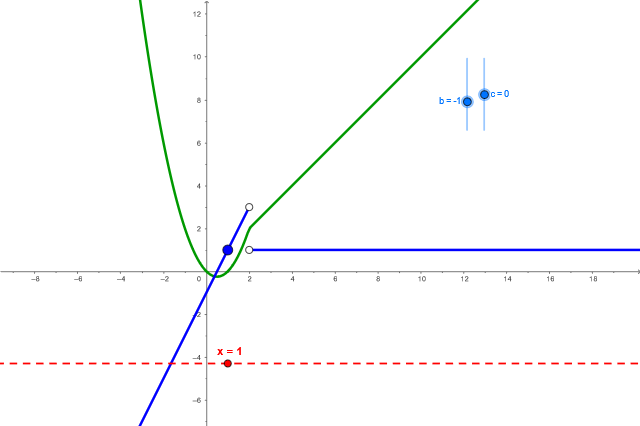
This example demonstrates how to construct piecewise functions and their derivatives using GeoGebra, visualizing the relationship between function graphs and derivative graphs. Core math concepts include functions, derivatives, function graphs, piecewise functions, and linear functions. Key GeoGebra commands used are If for conditional functions, Function for defining functions, Derivative for calculating derivatives, and Line, Point, OrthogonalLine, Intersect for geometric constructions. Suitable for high school mathematics teaching to help students understand the relationship between functions and derivatives and master basic GeoGebra operations.
GeoGebra Commands & Parameters
If(4 + (2 * b) + c ≟ 2, 0, 1) → test2If(b ≟ -3 ∧ c ≟ 4, 0, 1) → testFunction(x^(2) + (b * x) + c, -15, 2) → hFunction(x, 2, 15) → gDerivative(f) → f'Line(B, C) → dPoint(d) → DOrthogonalLine(D, d) → eIntersect(f', e, (0.9982599999999993, 0.9965199999999985)) → E
AI Drawing Prompt Reference
Draw a coordinate system with a piecewise function curve: a parabola on the left and a straight line on the right, meeting at x=2. The parabola's shape is adjustable via two sliders. Also plot the derivative curve of this piecewise function. Construct a line that intersects the function curve, pick a point on this line, draw a perpendicular line through that point, and mark its intersection with the derivative curve. Show the relationship between the function, its derivative, and the geometric construction.
The prompt above was compiled from the original drawing commands and is for reference only.