
GeoGebra Dilation Dynamics Construction Exercise
Loading the math board and drawing, please wait…
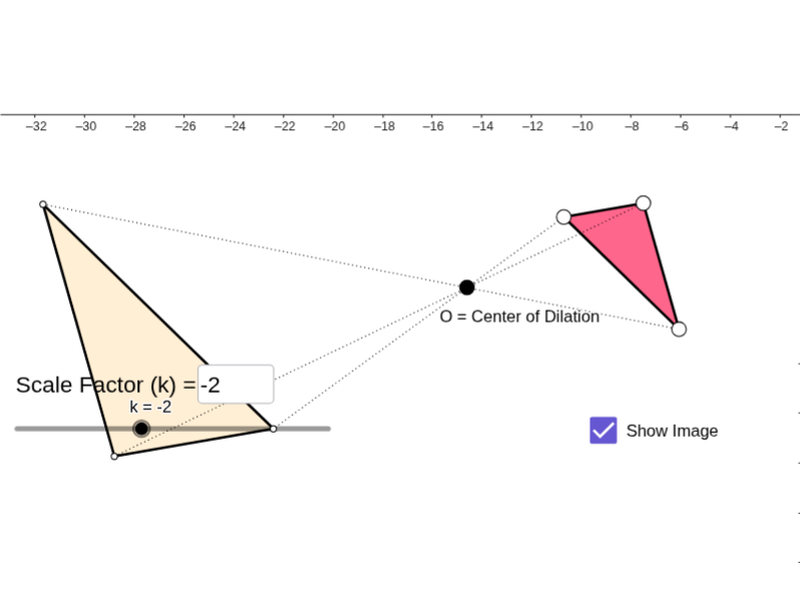
This example demonstrates the dynamic process of generating triangles and function graphs through scaling transformations. Key mathematical concepts include geometric dilation, function transformation, and coordinate geometry. Construction involves using GeoGebra commands like Polygon, Segment, Dilate to build shapes, and adjusting scaling parameters with sliders. Suitable for middle school students learning the integration of geometric transformations and function graphing.
GeoGebra Commands & Parameters
Polygon(A, B, C) → poly1, c, a, bSegment(A, B) → dSegment(B, C) → eSegment(C, A) → fTextfield(k) → InputBox1Dilate(A, k, O) → A'Dilate(B, k, O) → B'Dilate(C, k, O) → C'Polygon(A', B', C') → poly1', c', a', b'Dilate(A, k, O) → A'_1Dilate(B, k, O) → B'_1Segment(A'_1, B'_1) → d'Dilate(B, k, O) → B'_2Dilate(C, k, O) → C'_1Segment(B'_2, C'_1) → e'Dilate(C, k, O) → C'_2Dilate(A, k, O) → A'_2Segment(C'_2, A'_2) → f'Segment(O, A') → gSegment(O, A) → hSegment(O, B) → iSegment(O, B') → jSegment(O, C') → lSegment(O, C) → m
AI Drawing Prompt Reference
Draw a triangle and three segments, then perform a scaling transformation through a point to generate a new triangle. Inside the new triangle, draw three segments and include an input box for the scaling ratio. Use different colors to distinguish the original and transformed shapes, and draw lines connecting the origin to each transformed point to show the transformation process.
The prompt above was compiled from the original drawing commands and is for reference only.