
GeoGebra Animated Ball: Piecewise Functions and Tangent Lines
Loading the math board and drawing, please wait…
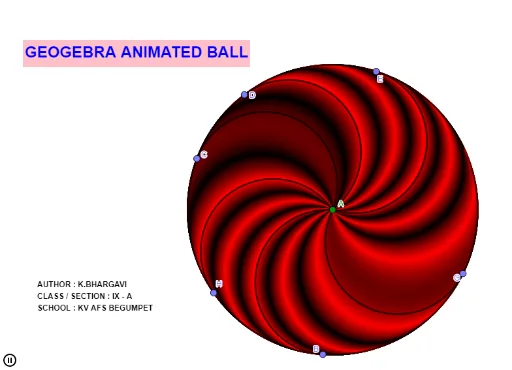
① This GeoGebra example presents an animated ball that dynamically illustrates the interplay between piecewise functions, the tangent function, and plane geometry elements such as rhombi. ② Core mathematical concepts include piecewise function graphs, periodicity of the tangent function, logical conditions for animation control, and properties of rhombi in plane geometry. ③ Construction highlights: based on the construction summary, the example uses commands like Circle, Point, and Semicircle, creating multiple points (A, B, C, D, E, F, G, H) and circles (c, d, e, f, g, h, k) as well as semicircles, with text objects (text1, text2) for labels or explanations. ④ This resource is suitable for middle and high school teachers for classroom demonstrations, or for students to explore the interaction between functions and geometry, and serves as an introductory example for creating animations in GeoGebra.
GeoGebra Commands & Parameters
Circle(A, 5) → cPoint(c) → BSemicircle(B, A) → dPoint(c) → CSemicircle(C, A) → ePoint(c) → DSemicircle(D, A) → fPoint(c) → ESemicircle(E, A) → gPoint(c) → FSemicircle(F, A) → hPoint(c) → GSemicircle(G, A) → kPoint(c) → HSemicircle(H, A) → p
AI Drawing Prompt Reference
Draw a circle with a fixed center. Place multiple points on the circumference, and from each point draw a semicircle toward the center, creating a series of petal-like or fan-shaped curves inside the circle. Each semicircle has its diameter equal to the distance from the center to the corresponding point on the circumference. Distribute the points evenly around the circle so the semicircles are symmetrically interleaved, giving a dynamic, rotating or periodic geometric appearance. Optionally add text labels to highlight the connection between functions and geometry.
The prompt above was compiled from the original drawing commands and is for reference only.