
Fraction Addition Demonstration by KBHARGAVI2022
Loading the math board and drawing, please wait…
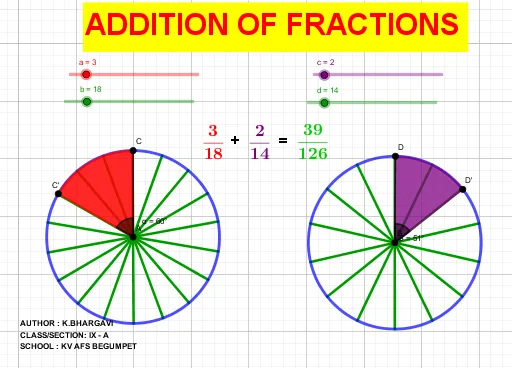
This example demonstrates the geometric interpretation of fraction addition. It involves core mathematical concepts such as fraction operations, geometric figure construction, and transformations. Key GeoGebra commands used include Circle, Point, Segment, Sequence, Rotate, Angle, CircleSector, and LCM. Suitable for middle school and above, it aids in understanding the geometric meaning and calculation of fraction addition.
GeoGebra Commands & Parameters
Circle(A, 3) → c_1Circle(B, 3) → d_1Point(c_1) → CSegment(A, C) → fPoint(d_1) → DSegment(B, D) → gSequence(Segment[A, Rotate[C, f°, A]], f, (360°) / b, 360, 360 / b) → l1Sequence(Segment[B, Rotate[D, g°, B]], g, (360°) / d, 360, 360 / d) → l2Rotate(C, (360° * a / b), A) → C'Angle(C, A, C') → αRotate(D, (-((360° * c / d))), B) → D'Angle(D', B, D) → βCircleSector(A, C, C') → eCircleSector(B, D', D) → hLCM(b, d) → s
AI Drawing Prompt Reference
Draw two circles with centers A and B and radius 3. Pick a point C on the first circle and draw line segment AC. Pick a point D on the second circle and draw line segment BD. Rotate point C around A by 360 degrees divided by b to form a series of segments. Rotate point D around B by 360 degrees divided by d to form a series of segments. Calculate the angles α between AC' and A, and β between BD' and B. Draw a sector with center A, endpoint C', and angle α. Draw a sector with center B, endpoint D', and angle β. Finally, calculate the least common multiple s of b and d.
The prompt above was compiled from the original drawing commands and is for reference only.