
Isosceles Triangle Incircle Construction
Loading the math board and drawing, please wait…
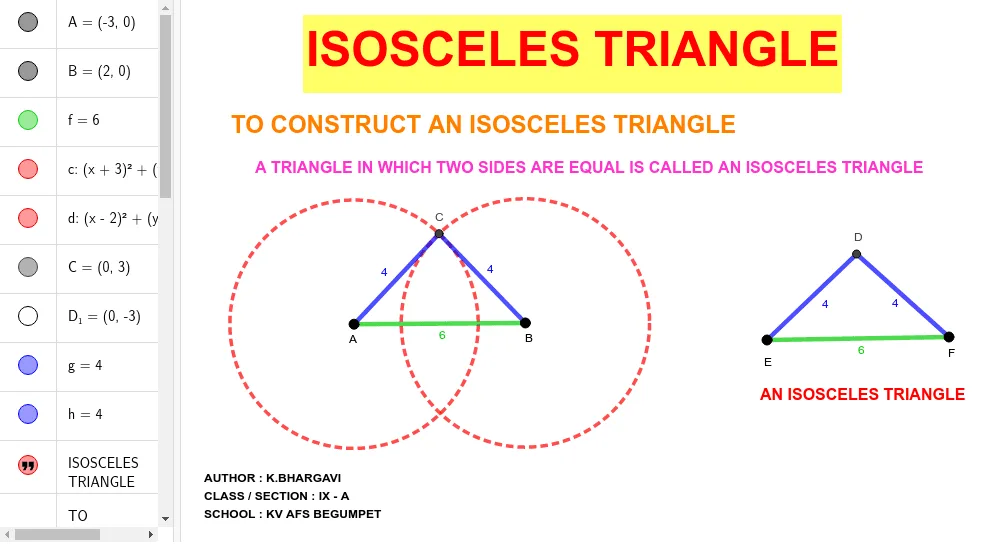
This GeoGebra example dynamically constructs an isosceles triangle and its incircle, illustrating the relationship between triangle symmetry, angle bisectors, and inscribed circle radius. Core concepts include isosceles triangle properties, incircle geometry, and trigonometric ratios. Built using Segment, Circle, and Intersect commands, it serves as a visual aid for high school geometry and trigonometry lessons, helping students explore how the incircle radius changes with vertex angles.
GeoGebra Commands & Parameters
Segment(A, B) → fCircle(A, 4) → cCircle(B, 4) → dIntersect(c, d) → C, D_1, ,Segment(A, C) → gSegment(C, B) → hSegment(E, F) → iCircle(E, 4) → eCircle(F, 4) → kIntersect(e, k) → D, H, ,Segment(E, D) → jSegment(D, F) → l
AI Drawing Prompt Reference
Draw an isosceles triangle with a horizontal base. Construct two circles of equal radius centered at the base endpoints; their intersection gives the apex, which connects to the base endpoints to form the triangle. Inside, take a segment parallel to the base, draw two equal circles at its endpoints, and use their intersection as the incenter. Connect this incenter to the segment endpoints to form a smaller isosceles triangle, then draw the incircle centered at this incenter, tangent to all three sides of the original triangle.
The prompt above was compiled from the original drawing commands and is for reference only.