
Geometric Construction and Properties of Right Triangles and Circumcircle
Loading the math board and drawing, please wait…
In collections
Special Right Triangle (2): Thinking Classroom Exploration
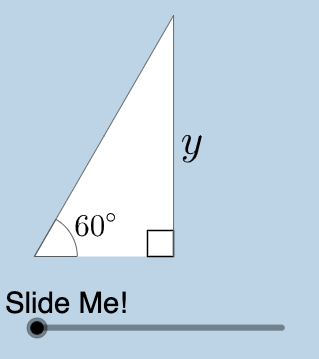
This example demonstrates the geometric construction of right triangles and isosceles triangles along with their circumcircle properties. Core mathematical concepts include: right triangle angle-side relationships (Pythagorean theorem, trigonometric ratios), symmetry of isosceles triangles, circumcircle center and radius properties, angle-arc relationships, and geometric inequality applications. Construction key points: Use Center command to locate circumcenter, Rotate for rotation transformations, Mirror for reflection, Polygon for polygon construction, Angle to measure angles, Dilate for scaling, and implement dynamic interaction through sliders. This example is suitable for middle to high school mathematics teaching, serving as a supplementary tool for chapters on trigonometry, geometric proofs, and circle knowledge.
GeoGebra Commands & Parameters
Center(c) → ARotate(B, pi / 3, A) → B'_1Intersect(h, i) → CMidpoint(A, B'_1) → JAngle(B, A, B'_1) → βRotate(B, pi / 4, A) → B'_2Angle(B, A, B'_2) → γIntersect(g, i) → DPolygon(A, D, B'_2) → poly2, b'_2, a_2, dPolygon(A, C, B'_1) → poly3, b'_1, a_3, c_1Dilate(A, If[0 < a ≤ 1, 1 - a, 0], J) → A'_1Segment(A, A'_1) → kDilate(J, If[1 < a ≤ 2, 2 - a, 0], B'_1) → F'CircleArc(A, B'_1, B) → pTextfield(r) → InputBox1Segment(J, F') → mMidpoint(C, B'_1) → KDilate(C, If[0 < a ≤ 1, 1 - a, 0], K) → C'Dilate(K, If[1 < a ≤ 2, 2 - a, 0], B'_1) → K'Segment(C, C') → jSegment(K, K') → lAngle(B'_1, C, A) → αDilate(A, If[2 < a ≤ 3, 3 - a, 0], C) → A'Segment(A, A') → nRotate(A, If[3.5 < a ≤ 4.5, ((a - 3.5) * pi / 3), pi / 3], A) → A'_3Rotate(A', If[3.5 < a ≤ 4.5, ((a - 3.5) * pi / 3), pi / 3], A) → A''Segment(A'_3, A'') → n'Rotate(A'_3, If[4.5 < a ≤ 5.5, ((a - 4.5) * pi), pi], J) → FRotate(A'', If[4.5 < a ≤ 5.5, ((a - 4.5) * pi), pi], J) → A'''Segment(F, A''') → n''CircleArc(A, B, B'_1) → qRotateText(text4, ((-pi)) / 2) → text6Mirror(A, j) → A'_{2}Mirror(C, j) → C'_{1}Mirror(B'_1, j) → EPolygon(A'_{2}, C'_{1}, E) → poly3', e, a'_{2}, c'_{1}Mirror((0, 0), A') → GRotate((0, 0), (-(pi / 3)), G) → HMirror(F, l) → F'_{1}Mirror(A''', l) → ISegment(F'_{1}, I) → n'''Mirror(A'_3, j) → LMirror(A'', j) → A'''_{1}Segment(L, A'''_{1}) → n''_{1}Mirror(A, j) → A'_{4}Mirror(A', j) → A''_{1}Segment(A'_{4}, A''_{1}) → n'_{1}Angle(N, M, (0, 0)) → δ
AI Drawing Prompt Reference
Draw a right triangle and an isosceles triangle, showing their circumcircle. Label the three vertices of the right triangle and draw the circumcircle. Measure and display the two acute angles of the right triangle and the midpoint of the hypotenuse. Use rotation and reflection to demonstrate the symmetry of the isosceles triangle. Adjust the size and angles of the triangles with dynamic sliders to observe the changes in the circumcircle.
The prompt above was compiled from the original drawing commands and is for reference only.