
Dynamic Geometry for Right-Triangle Trigonometric Ratios (sin, cos, tan)
Loading the math board and drawing, please wait…
In collections
Thinking Classroom Exploration: RT Trig (Solving for Sides)
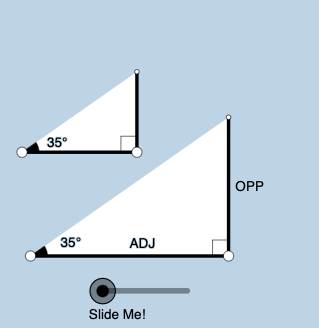
This example uses a dynamic geometric construction to illustrate how the trigonometric ratios (sine, cosine, and tangent) in a right triangle change as the angle α varies. The key math concepts are right triangles, trigonometric functions (sin/cos/tan), and the geometric definitions of ratios as side lengths (opposite/adjacent/hypotenuse), together with angle measurement and correspondence between the algebraic ratio and its geometric representation. Construction highlights: Points and Segments set up the triangle’s vertices and edges; OrthogonalLine enforces the right angle; Ray and Angle label and track the moving angle α. A Circle plus Intersect creates auxiliary relationships tied to the circular construction, while Rotate and RotateText drive the synchronized motion of the triangle and angle annotations. Polygon and Textfield/Text provide real-time visual context (e.g., triangle shape and ratio readouts), and Midpoint is used where needed for constructing dependent elements. It is well suited for middle/high school students and classroom demonstrations focused on understanding the geometric meaning of trigonometric ratios and interactive exploration.
GeoGebra Commands & Parameters
Point(Ray[A, A + (1, 0)]) → BSegment(A, B) → fOrthogonalLine(B, f) → gRotate(B, (a * pi / 180), A) → B'Angle(B, A, B') → αRay(A, B') → hCircle(B, 2) → cIntersect(c, g, 2) → CRay(B, C) → iIntersect(h, i) → DSegment(B, D) → jSegment(A, D) → kPolygon(A, B, D) → poly1, d, a_1, bRotate(B, If[0 < e ≤ 1, (-((e * (pi / 2 - α)))), α - pi / 2], D) → B'_1Rotate(D, If[0 < e ≤ 1, (-((e * (pi / 2 - α)))), α - pi / 2], D) → D'Segment(B'_1, D') → j'Rotate(A, If[0 < l ≤ 1, (α * l), α], A) → A'Rotate(B, If[0 < l ≤ 1, (α * l), α], A) → B'_2Segment(A', B'_2) → f'Rotate(B, If[0 < m ≤ 1, (m * pi / 2), pi / 2], B) → B'_3Rotate(D, If[0 < m ≤ 1, (m * pi / 2), pi / 2], B) → D'_1Segment(B'_3, D'_1) → j'_1Textfield(a) → InputBox1Angle(D, B, A) → βMidpoint(A, D) → ERotateText(text7, α) → text8Midpoint(A', B'_2) → FRotateText(text9, α) → text10Point(Ray[G, G + (1, 0)]) → HSegment(G, H) → tRotate(H, (a * pi / 180), G) → H'Ray(G, H') → f_1OrthogonalLine(H, t) → g_1Intersect(g_1, f_1) → IPolygon(G, H, I) → t1, i_1, g_2, h_1Angle(H, G, I) → γSegment(H, I) → j_1Rotate(H, If[0 < e ≤ 1, ((-e) * (pi / 2 - α)), (-(pi / 2 - α))], I) → H'_{1}Rotate(I, If[0 < e ≤ 1, ((-e) * (pi / 2 - α)), (-(pi / 2 - α))], I) → I'Segment(H'_{1}, I') → k_1Rotate(G, If[0 < l ≤ 1, (l * α), α], G) → G'Rotate(H, If[0 < l ≤ 1, (l * α), α], G) → H'_{2}Segment(G', H'_{2}) → t'Angle(I, H, G) → δRotate(H, If[0 < m ≤ 1, (m * pi / 2), pi / 2], H) → H'_{3}Rotate(I, If[0 < m ≤ 1, (m * pi / 2), pi / 2], H) → I'_{1}Segment(H'_{3}, I'_{1}) → l_1
AI Drawing Prompt Reference
Draw a dynamic right triangle with angle α that can change, showing how sine, cosine, and tangent ratios vary. Include a fixed vertex A and a moving vertex B that changes with angle α, with a perpendicular line establishing the right angle. Add a circle intersecting one side at point C to create auxiliary lines. Label the lengths of the triangle's sides and angles, and display the sine, cosine, and tangent values. The triangle and angle annotations should rotate together with α to visually demonstrate the geometric meaning of trigonometric ratios.
The prompt above was compiled from the original drawing commands and is for reference only.