
Special Right Triangles on the Unit Circle (Quadrant I Tangency)
Loading the math board and drawing, please wait…
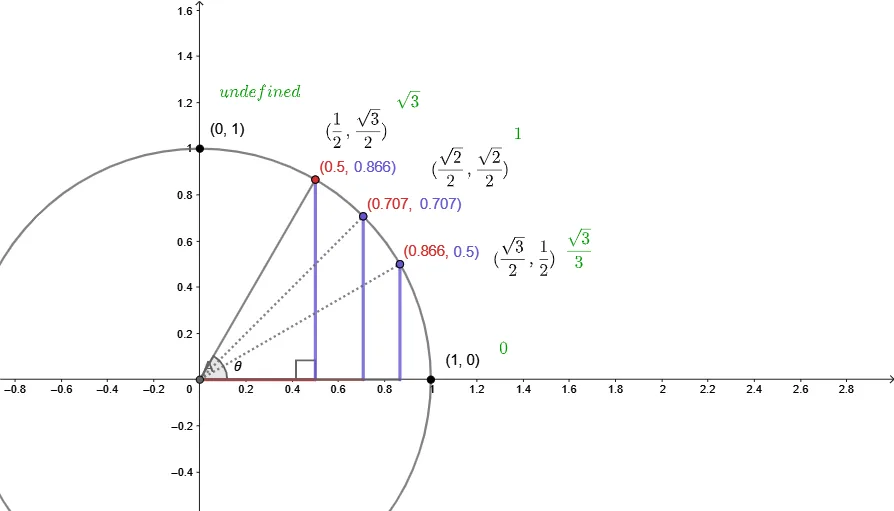
This example demonstrates how to construct special right triangles from a point on the unit circle in Quadrant I, using tangency to reveal the geometric meaning behind the tangent function. The key ideas are the unit circle, right-triangle relations, trigonometric functions (especially sine and tangent), the tangent line to a circle, and how angle measures translate into side ratios. Construction highlights using GeoGebra commands include Intersect (to find key intersection points), Point and Circle (to place and define the unit circle point and reference objects), Segment (to build triangle sides), OrthogonalLine (to create right angles via perpendicular lines and feet), Rotate (to generate the “special” rotated configuration), and Angle (to label and track the essential angles). The resulting diagram is intended for students learning trigonometry with geometric intuition, for classroom demonstrations, and for self-study of the connection between tangent geometry and right-triangle side ratios.
GeoGebra Commands & Parameters
Intersect(xAxis, yAxis) → APoint(yAxis) → BCircle(A, B) → cIntersect(c, xAxis, 2) → CRotate(C, 60°, A) → C'Segment(A, C') → fOrthogonalLine(C', xAxis) → gIntersect(g, xAxis) → DSegment(A, D) → hSegment(D, C') → iAngle(D, A, C') → αAngle(A, D, C') → γIntersect(c, f, 1) → EIntersect(c, f, 1) → FIntersect(c, xAxis, 2) → GRotate(G, 30°, A) → G'Rotate(G, 45°, A) → G'_{1}OrthogonalLine(G'_{1}, xAxis) → jOrthogonalLine(G', xAxis) → kIntersect(j, xAxis) → HIntersect(k, xAxis) → ISegment(H, G'_{1}) → lSegment(I, G') → mIntersect(c, yAxis, 1) → JSegment(A, H) → nSegment(A, I) → pSegment(A, G'_{1}) → qSegment(A, G') → rIntersect(c, m, 1) → KIntersect(c, l, 1) → L
AI Drawing Prompt Reference
Draw a unit circle in the first quadrant and mark a point on it. Draw a tangent line to the circle that touches the x-axis. Find the intersection point C of the tangent line with the circle. Draw a circle centered at the origin passing through C, and find its intersection point C' with the x-axis. Connect the origin to C' and draw a perpendicular line from C' to the x-axis, meeting it at D. Connect the origin to D and D to C' to form a right triangle. Find points E and F where the tangent line touches the circle. Rotate point C' by 60° and 30° around the origin to get points C' and G'. Rotate C' by 45° to get G'₁. Draw perpendicular lines from G'₁ and G' to the x-axis, meeting it at points H and I. Connect H to G'₁ and I to G' to form two right triangles. Finally, connect the origin to H, I, G'₁, and G', and find the intersection points K and L where the circle intersects the line segments G'₁G'.
The prompt above was compiled from the original drawing commands and is for reference only.