
GeoBoard Geometric Construction Example
Loading the math board and drawing, please wait…
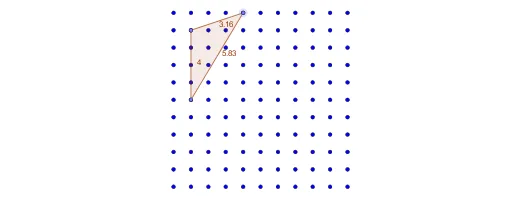
This example demonstrates dynamic geometric construction and exploration using GeoGebra, focusing on polygons, central points, and interactive elements. Core math concepts include polygon construction, centroid/barycenter calculation, and geometric transformations. Construction highlights from the summary involve commands like Sequence, Point, and Polygon. Suitable for high school and above learners to understand geometric construction principles and the application of dynamic geometry software.
GeoGebra Commands & Parameters
Sequence(Sequence[(i, a - b), i, 0, a], b, 0, a) → l3Point(l3) → APoint(l3) → BPoint(l3) → CPolygon(A, B, C) → t1, c, a_1, b
AI Drawing Prompt Reference
On a coordinate plane, generate a grid of points evenly spaced within a rectangular region. Randomly select three of these points and connect them with line segments to form a triangle. Mark the centroid (intersection of medians) inside the triangle. Allow the triangle's vertices to be draggable, so that when moved, the triangle reshapes and the centroid shifts accordingly. The final image should clearly show the point grid, the triangle, and the centroid marker, suitable for interactive geometric exploration.
The prompt above was compiled from the original drawing commands and is for reference only.