
Triangular Prism by Bed Prasad Dhakal
Loading the math board and drawing, please wait…
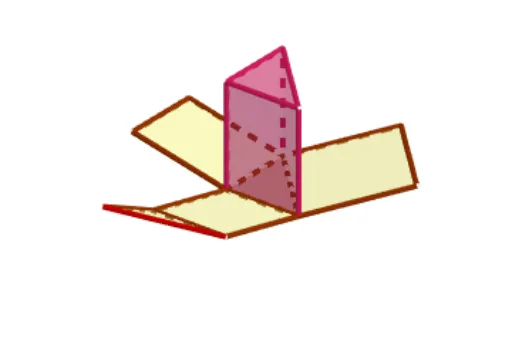
This example demonstrates the construction of a triangular prism. It involves key mathematical concepts such as triangles, prisms, and angles. Using GeoGebra commands like Intersect, Point, and Prism, various faces and edges of the triangular prism can be constructed. Suitable for students at the junior high school level and above, focusing on solid geometry.
GeoGebra Commands & Parameters
Intersect(zAxis, yAxis) → APoint(xAxis) → BPoint(yAxis) → CPoint(zAxis) → FPrism(A, B, C, F) → a, D, edgeAC, edgeAF, edgeBD, edgeCE, edgeDF, edgeDE, edgeEF, E, faceABC, faceABDF, faceBCED, faceACEF, faceDEF, edgeAB, edgeBCNet(a, FoldUnfold) → c, G, P, faceGHI, faceGHKJ, faceHIML, faceGINO, faceJKP, edgeGH, edgeHI, edgeGI, edgeGJ, H, edgeJK, edgeHK, edgeHL, edgeLM, edgeIM, edgeIN, edgeNO, edgeGO, edgeKP, edgeJP, I, J, K, L, M, N, O
AI Drawing Prompt Reference
Draw a triangular prism with two parallel triangular bases and four rectangular sides. Start by creating point B on the x-axis, point C on the y-axis, and point F on the z-axis. Then construct the prism using points A, B, C, and F. Finally, unfold the prism to see the net, which includes 8 faces and 12 edges.
The prompt above was compiled from the original drawing commands and is for reference only.