
Generating an Ellipse
Loading the math board and drawing, please wait…
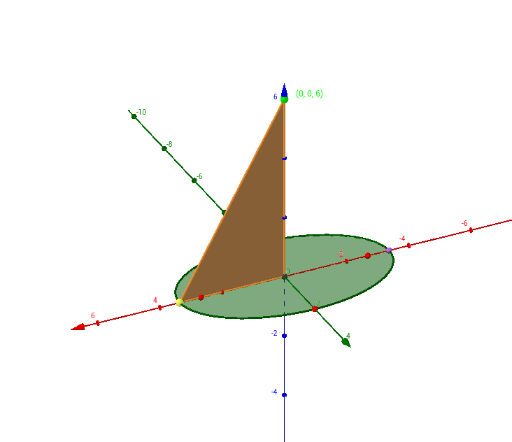
This example demonstrates the generation of an ellipse. It involves the basic properties and parametric equations of an ellipse. Using GeoGebra commands such as Ellipse, Mirror, and Vector, the shape and position of the ellipse can be dynamically adjusted. Suitable for high school mathematics education and learning about ellipse concepts.
GeoGebra Commands & Parameters
Intersect(xAxis, yAxis) → EPoint(xAxis) → ADistance(A, (0, 0)) → cPoint(zAxis) → CPoint(yAxis) → BMirror(A, yAxis) → A'Ellipse(A, A', B) → dAngle(C, B, (0, 0)) → αSurface(((a * s) * cos(t)), ((b * s) * sin(t)), (z(C) * s) + z(C), s, -1, 0, t, (-π), γ - π) → hVector((0, 0), C) → uSegment(C, F) → fPolygon(C, E, F) → Polígon1, f_1, c_1, eIntersect(d, xAxis) → D, GPolygon(C, E, G) → Polígon2, g, c_2, e_1Angle(G, E, F, xOyPlane) → β
AI Drawing Prompt Reference
Draw an ellipse centered at the origin with foci at points A and A', and vertex at point B. Start by creating point A on the x-axis and calculate its distance c from the origin. Then create points B and A' on the y-axis. Use points A, A', and B to create the ellipse d. Finally, create an angle α with point C and generate the surface of the ellipse h using parametric equations.
The prompt above was compiled from the original drawing commands and is for reference only.