
General Form
Loading the math board and drawing, please wait…
In collections
COORDINATE GEOMETRY
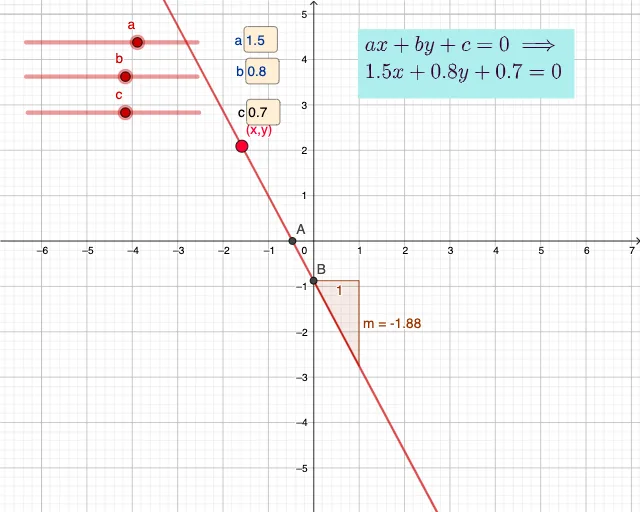
This example demonstrates the general form of a line equation and its interaction with points and slopes. Core math concepts include line equations, slope calculation, intersection points, and analytical geometry. Construction highlights: uses Slope for slope calculation, Intersect for finding intersections, Textfield and Point for displaying results, with variables a, b, c for coefficients, m for slope, points A, B, and InputBoxes for user input. Suitable for high school students learning about line equations and applications.
GeoGebra Commands & Parameters
Slope(eq1) → mIntersect(xAxis, eq1) → AIntersect(eq1, yAxis) → BTextfield(a) → InputBox1Textfield(b) → InputBox2Textfield(c) → InputBox3Point(eq1) → C
AI Drawing Prompt Reference
Create a coordinate plane showing a line defined by its general-form equation using coefficients a, b, and c (provide input fields for these values). Compute and display the line’s slope as a key result. Then construct the intersection point of the line with the x-axis and the intersection point of the line with the y-axis, and plot both points on the graph. Also add a point tied to the line equation to represent the relationship on the plane, and include text fields for a, b, and c so the user can update the line and its derived quantities.
The prompt above was compiled from the original drawing commands and is for reference only.