
Function Slope and Derivative Function Dynamic Demo
Loading the math board and drawing, please wait…
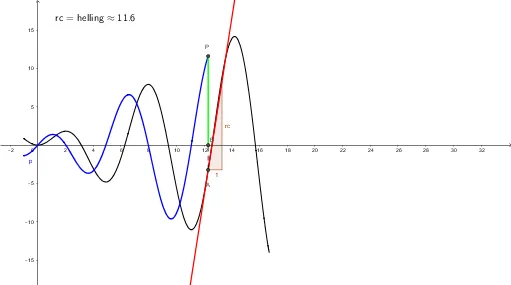
This GeoGebra example dynamically illustrates the connection between the slope of a tangent line at a point on a function's graph and its derivative function. The core mathematical concept is the geometric meaning of the derivative as the tangent slope, and how the derivative function represents the rate of change of the original function. Construction details: uses Segment command to draw the tangent segment, Tangent command to generate the tangent line at a point, Slope command to calculate the slope; objects include the original function f, derivative f', moving point A, slope value 'helling', and auxiliary segments and text labels. By dragging point A, users can see how the tangent slope varies with position and corresponds to the derivative graph. Suitable for high school and early college students learning calculus to understand the definition of derivative and local linear approximation.
GeoGebra Commands & Parameters
Segment(B, P) → iSegment(A, B) → jTangent(A, h) → kSlope(k) → rc
AI Drawing Prompt Reference
Draw the graph of a function f and dynamically show a movable point A on the graph. Draw the tangent line at point A and display its slope helling. Observe how the slope changes as point A moves and compare it with the graph of the derivative function f'. Understand the geometric meaning of the derivative and the local linear approximation of the function.
The prompt above was compiled from the original drawing commands and is for reference only.