
Friction and Free Body Diagrams
Loading the math board and drawing, please wait…
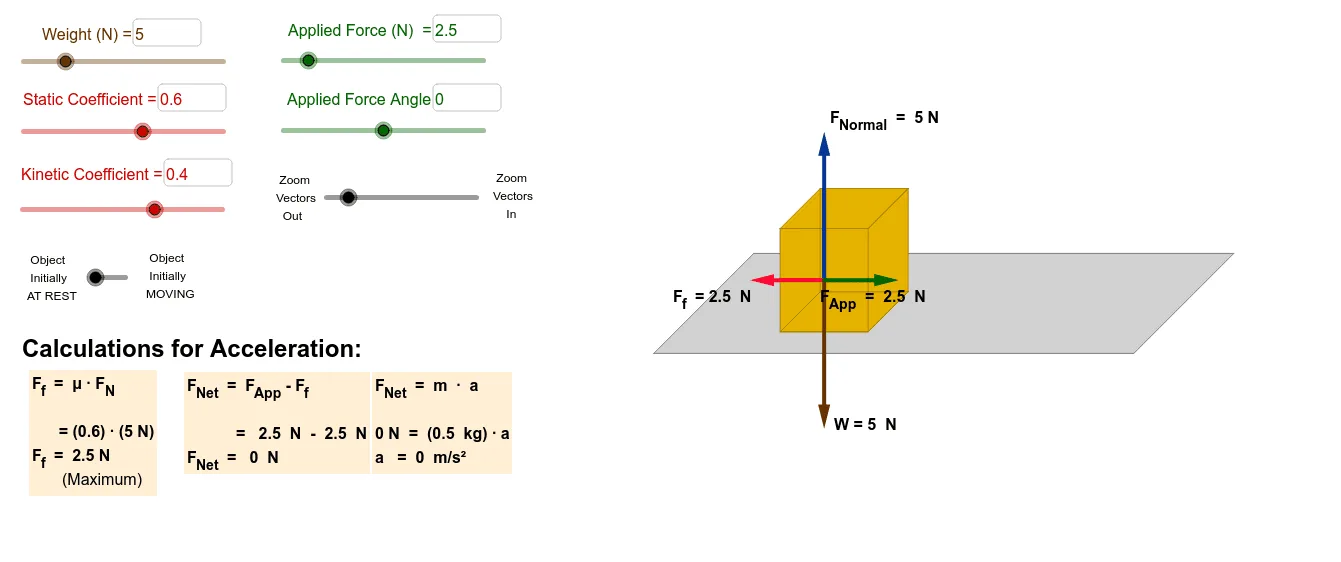
This example demonstrates the application of friction and free body diagrams in physics mechanics. It involves core mathematical concepts like vectors, angle calculations, geometric constructions, and calculus. GeoGebra commands and objects used include If, Polygon, Segment, Point, Midpoint, Textfield, Vector, and Angle. Suitable for high school physics and mathematics education to understand mechanical principles and geometric representations.
GeoGebra Commands & Parameters
If(t > tstatic, 1, 0) → testmovePolygon(A, B, C, D) → poly1, a, b, c, dPolygon(E, F, G, H) → poly2, e, f, g, hPolygon(H, G, C, D) → poly3, h_1, g_1, c_1, d_1Polygon(G, F, B, C) → poly4, g_2, f_1, b_1, c_2Segment(E, A) → iPoint(yAxis) → IPoint(yAxis) → JMidpoint(G, B) → TSegment(T, U) → qPolygon(C_1, D_1, E_1, F_1) → poly7, c_3, d_2, e_1, f_2Textfield(Weight) → InputBox1Textfield(SurfaceArea) → InputBox2If(Initial > 0, Ffkinetic, If[Ffstaticmax > Fappx, Fappx, Ffstaticmax]) → FfVector(Q, Z) → uVector(Q, H_1) → wVector(Q, G_1) → jVector(Q, W) → kVector(Q, R) → lVector(R, W) → mMidpoint(Q, W) → M_1Midpoint(W, R) → N_1Midpoint(R, Q) → O_1Midpoint(Q, G_1) → I_1Midpoint(Q, Z) → J_1Midpoint(Q, H_1) → K_1If(Fapp > Weight, asin(Weight / Fapp), (0.25 * π)) → anglemaxAngle(R, Q, W) → αAngle(W, Q, R) → βTextfield(Fapp) → InputBox3Textfield(CoeffS) → InputBox4Textfield(CoeffK) → InputBox5Textfield(angle) → InputBox6If(Initial > 0, CoeffK, CoeffS) → Coeff
AI Drawing Prompt Reference
Draw a friction and free body diagram example. Start by drawing four rectangles to represent the ground and the object, then add vectors for friction and gravity. Use input boxes to set the friction coefficient and gravity, calculate the friction force, and draw the friction vector. Finally, based on the relationship between friction and gravity, draw the object's direction of motion and the angle.
The prompt above was compiled from the original drawing commands and is for reference only.