
Friction and Free Body Diagrams Interactive Demo
Loading the math board and drawing, please wait…
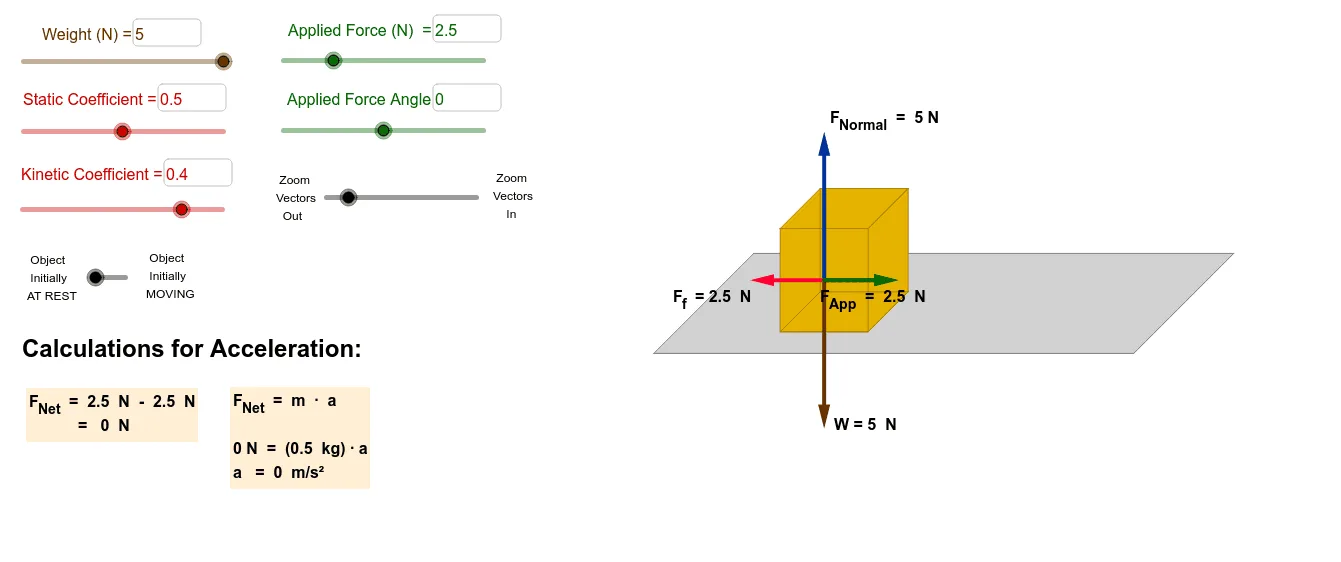
This GeoGebra example provides an interactive demonstration of free body diagrams for an object on an inclined plane, incorporating friction, gravity, normal force, and an applied force. It visually shows how forces are decomposed into vector components and how static vs. kinetic friction thresholds determine motion. Core mathematical concepts include vector resolution, equilibrium conditions, Newton's second law, and the role of the friction coefficient. The construction uses GeoGebra commands such as If, Polygon, Segment, Point, Midpoint, Textfield, Vector, and Angle, with objects like Fapp (applied force), angle (inclination), CoeffS (static friction coefficient), Weight, FNormal, tstatic (static friction), and testmove (motion test). Users can adjust sliders or input fields to change parameters and observe real-time updates of the force vectors and motion state. This resource is ideal for high school or introductory college physics students learning mechanics and vector analysis, and for teachers demonstrating the relationship between friction direction and impending motion.
GeoGebra Commands & Parameters
If(t > tstatic, 1, 0) → testmovePolygon(A, B, C, D) → poly1, a, b, c, dPolygon(E, F, G, H) → poly2, e, f, g, hPolygon(H, G, C, D) → poly3, h_1, g_1, c_1, d_1Polygon(G, F, B, C) → poly4, g_2, f_1, b_1, c_2Segment(E, A) → iPoint(yAxis) → IPoint(yAxis) → JMidpoint(G, B) → TSegment(T, U) → qPolygon(C_1, D_1, E_1, F_1) → poly7, c_3, d_2, e_1, f_2Textfield(Weight) → InputBox1Textfield(SurfaceArea) → InputBox2If(Initial > 0, Ffkinetic, If[Ffstaticmax > Fappx, Fappx, Ffstaticmax]) → FfVector(Q, Z) → uVector(Q, H_1) → wVector(Q, G_1) → jVector(Q, W) → kVector(Q, R) → lVector(R, W) → mMidpoint(Q, W) → M_1Midpoint(W, R) → N_1Midpoint(R, Q) → O_1Midpoint(Q, G_1) → I_1Midpoint(Q, Z) → J_1Midpoint(Q, H_1) → K_1If(Fapp > Weight, asin(Weight / Fapp), (0.25 * π)) → anglemaxAngle(R, Q, W) → αAngle(W, Q, R) → βTextfield(Fapp) → InputBox3Textfield(CoeffS) → InputBox4Textfield(CoeffK) → InputBox5Textfield(angle) → InputBox6