
Fractions Representation Part 2
Loading the math board and drawing, please wait…
In collections
Elementary School
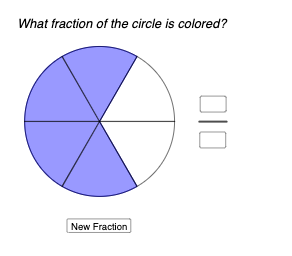
This example demonstrates the geometric representation of fractions. Key mathematical concepts include fractions, geometric transformations, and cubes. Using GeoGebra commands such as Point, Random, Max, Min, Circle, Intersect, etc., dynamic geometric figures can be constructed. Suitable for middle school and above students to learn about fractions and geometric transformations.
GeoGebra Commands & Parameters
Point(xAxis) → ARandom(2, 10) → dRandom(1, d) → sc2Random(1, d) → sc1Max(sc1, sc2) → enMin(sc1, sc2) → bgCircle(A, 1) → cIntersect(c, xAxis, 2) → BSequence(Rotate[B, (st * i), A], i, 0, d) → l1, {(1, 0), (0.5000000000000001, 0.8660254037844386), (-0.4999999999999998, 0.8660254037844387), (-1, 1.2246467991473532E-16), (-0.5000000000000004, -0.8660254037844385), (0.49999999999999933, -0.866025403784439), (1, -2.4492935982947064E-16)}Rotate(B, st, A) → B'Random(2, d) → aSequence(Segment[Element[l1, i], A], i, 1, d) → f, {1, 1, 1, 1, 1, 1}CircleSector(A, Element[l1, bg], Element[l1, en]) → eTextfield(m) → InputBox1Textfield(n) → InputBox2Segment(C, D) → gRandom(0.15, 0.95) → rcolorRandom(0.15, 0.95) → gcolorRandom(0.15, 0.95) → bcolor
AI Drawing Prompt Reference
Draw a circle centered on the x-axis, then rotate d points equally around this circle, where d is a random number between 2 and 10. Next, randomly select two points as the start and end positions to draw a sector with the circle center. Finally, generate two random color values to color the shapes.
The prompt above was compiled from the original drawing commands and is for reference only.