
Fraction Multiplication Demonstration by Gareth Daniels
Loading the math board and drawing, please wait…
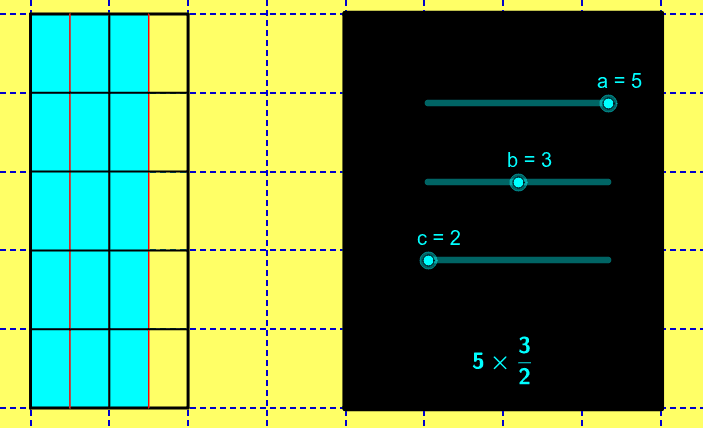
This example demonstrates how to multiply a fraction by an integer, supporting improper fractions. Key math concepts include fractions and multiplication. Using GeoGebra commands like Polygon, Sequence, and Segment, the process of fraction multiplication is clearly illustrated. Suitable for high-grade elementary and junior high school students.
GeoGebra Commands & Parameters
Polygon(F, E, B, A) → poly1, f, e, b_1, a_1Polygon(F, D, C, A) → poly2, f_1, d_1, c_1, a_2Sequence((0, i), i, 1, a - 1) → list1Sequence((d, i), i, 1, a - 1) → list2Sequence(Segment[Element[list1, i], Element[list2, i]], i, 1, a - 1) → list3Sequence((i / c, 0), i, 1, d * c) → list4Sequence((i / c, a), i, 1, d * c) → list5Sequence(Segment[Element[list4, i], Element[list5, i]], i, 1, c * d) → list6Segment(E, B) → gPolygon(G, H, I, J) → poly3, g_1, h, i, jSegment(G, H) → kSegment(H, I) → lSegment(I, K) → mSegment(K, G) → nSequence((i, 0), i, 1, floor(b / c)) → list7Sequence((i, a), i, 1, floor(b / c)) → list8Sequence(Segment[Element[list7, i], Element[list8, i]], i, 1, floor(b / c)) → list9
AI Drawing Prompt Reference
Draw a diagram demonstrating the multiplication of a fraction by an integer. Start by drawing a rectangle and dividing it into smaller rectangles to show the result of the multiplication. Then, draw a horizontal and a vertical line to represent the denominator and the numerator of the fraction. Finally, use line segments to connect these points and form a grid, illustrating the steps of fraction multiplication.
The prompt above was compiled from the original drawing commands and is for reference only.