
Fraction Associations: Interactive Random Circles and Geometric Probability
Loading the math board and drawing, please wait…
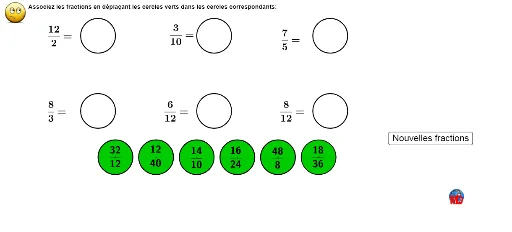
① This GeoGebra example demonstrates the association between fractions, inequalities, and geometric probability through randomly generated points and circles, incorporating circumcircles and area concepts. ② Core mathematical concepts include fraction representation, differential equations (as a background tag), inequalities, area calculation, circumscribed circles, and random experiments; the inclusion of random points in circles links fractions to probability visually. ③ Construction highlights: using GeoGebra commands Random, Shuffle, Element, If, and Circle to generate random point sets and circles, with multiple objects (a, e, d, b, bb, dd, f, aa, ff, ee, ar, br, c, cc, cr, dr, er, fr, lijst) and a button Bouton1 that triggers random shuffling to dynamically update fraction associations. ④ Suitable for middle school mathematics, this tool aids teaching fraction concepts, geometric probability, inequalities, and circle properties, and serves as an interactive exploration of random experiments and area relationships.
GeoGebra Commands & Parameters
Random(1, 12) → aRandom(1, 12) → eRandom(1, 12) → dRandom(1, 12) → bRandom(1, 12) → bbRandom(1, 12) → ddRandom(1, 12) → fRandom(1, 12) → aaRandom(1, 12) → ffRandom(1, 12) → eeRandom(1, 12) → cRandom(1, 12) → ccShuffle({(-10, 3.5), (0, 3.5), (10, 3.5), (-10, -3), (0, -3), (10, -3)}) → lijst, {(-10, -3), (0, 3.5), (10, 3.5), (10, -3), (-10, 3.5), (0, -3)}Element(lijst, 1) → AElement(lijst, 2) → BElement(lijst, 3) → CElement(lijst, 4) → DElement(lijst, 5) → EElement(lijst, 6) → FIf(Distance[A, AA] < 0.5, ar, If[Distance[A, BB] < 0.5, br, If[Distance[A, CC] < 0.5, cr, If[Distance[A, DD] < 0.5, dr, If[Distance[A, EE] < 0.5, er, If[Distance[A, FF] < 0.5, fr, 0]]]]]) → antaIf(Distance[B, AA] < 0.5, ar, If[Distance[B, BB] < 0.5, br, If[Distance[B, CC] < 0.5, cr, If[Distance[B, DD] < 0.5, dr, If[Distance[B, EE] < 0.5, er, If[Distance[B, FF] < 0.5, fr, 0]]]]]) → antbIf(Distance[C, AA] < 0.5, ar, If[Distance[C, BB] < 0.5, br, If[Distance[C, CC] < 0.5, cr, If[Distance[C, DD] < 0.5, dr, If[Distance[C, EE] < 0.5, er, If[Distance[C, FF] < 0.5, fr, 0]]]]]) → antcIf(Distance[D, AA] < 0.5, ar, If[Distance[D, BB] < 0.5, br, If[Distance[D, CC] < 0.5, cr, If[Distance[D, DD] < 0.5, dr, If[Distance[D, EE] < 0.5, er, If[Distance[D, FF] < 0.5, fr, 0]]]]]) → antdIf(Distance[E, AA] < 0.5, ar, If[Distance[E, BB] < 0.5, br, If[Distance[E, CC] < 0.5, cr, If[Distance[E, DD] < 0.5, dr, If[Distance[E, EE] < 0.5, er, If[Distance[E, FF] < 0.5, fr, 0]]]]]) → anteIf(Distance[F, AA] < 0.5, ar, If[Distance[F, BB] < 0.5, br, If[Distance[F, CC] < 0.5, cr, If[Distance[F, DD] < 0.5, dr, If[Distance[F, EE] < 0.5, er, If[Distance[F, FF] < 0.5, fr, 0]]]]]) → antfRandom(2, 4) → facaRandom(2, 4) → facbRandom(2, 4) → faccRandom(2, 4) → facdRandom(2, 4) → faceRandom(2, 4) → facfCircle(A, 1.5) → gCircle(C, 1.5) → g_2Circle(D, 1.5) → g_3Circle(E, 1.5) → g_4Circle(F, 1.5) → g_5Circle(B, 1.5) → g_1Circle(AA, 1.5) → hCircle(BB, 1.5) → kCircle(CC, 1.5) → pCircle(DD, 1.5) → qCircle(EE, 1.5) → rCircle(FF, 1.5) → sCircle(AA, 1.5) → tCircle(BB, 1.5) → c_1Circle(CC, 1.5) → d_1Circle(DD, 1.5) → e_1Circle(EE, 1.5) → f_1Circle(FF, 1.5) → h_1