
Fraction Addition Assessment
Loading the math board and drawing, please wait…
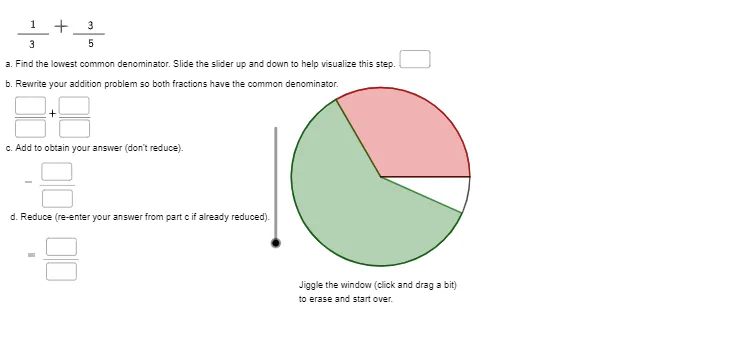
This example demonstrates the calculation and visualization process of adding fractions. It involves core mathematical concepts such as fraction operations, GCD, linear functions, and geometric transformations. The construction utilizes GeoGebra commands like RandomElement, GCD, Rotate, Angle, CircleSector, Segment, Textfield, LaTeX, and objects including v, b, B, A, n, g, h, eq1, text1, m, c, A', α, a, d, A'', β, e, f, A'_{1}, i, j, k, text8, l, text11, text12, lcd, InputBox5, text2, text13, text14, text15, text16, o, InputBox1, p, InputBox2, n_1, InputBox3. It is suitable for middle school and above mathematics teaching, used for demonstrating and assessing fraction addition.
GeoGebra Commands & Parameters
RandomElement({5, 7}) → bRandomElement({3, 15, 9, 7, 14}) → nGCD(n, b) → gRandomElement({1, 2, -1, -2}) → mRotate(A, c, B) → A'Angle(A, B, A') → αRandomElement({1, 3}) → aRotate(A', d, B) → A''Angle(A', B, A'') → βCircleSector(B, A, A') → eCircleSector(B, A', A'') → fRotate(A, ((2 * π) * v / h), B) → A'_{1}Segment(B, A'_{1}) → iTextfield(lcd) → InputBox5LaTeX(m, true, false) → text13LaTeX(n, true, false) → text14LaTeX(a, true, false) → text15LaTeX(b, true, false) → text16Textfield(o) → InputBox1Textfield(p) → InputBox2Textfield(n_1) → InputBox3Textfield(q) → InputBox4Textfield(r) → InputBox6Textfield(s) → InputBox7Textfield(t) → InputBox8Textfield(u) → InputBox9
AI Drawing Prompt Reference
Create a geometric visualization for fraction addition assessment. Start with two random integers as numerator and denominator, and compute their greatest common divisor. Place two fixed points on the plane as centers, and generate two circular sectors via rotation, with sector angles proportional to the fraction values. Draw a segment from the center to represent the sum of the two fractions. Around the figure, place multiple input boxes for entering numerators, denominators, and the result, along with displayed fraction expressions and text labels. The layout should be clear and suitable for teaching.
The prompt above was compiled from the original drawing commands and is for reference only.