
Binomial Distribution Calculator with Visual Interval Selection
Loading the math board and drawing, please wait…
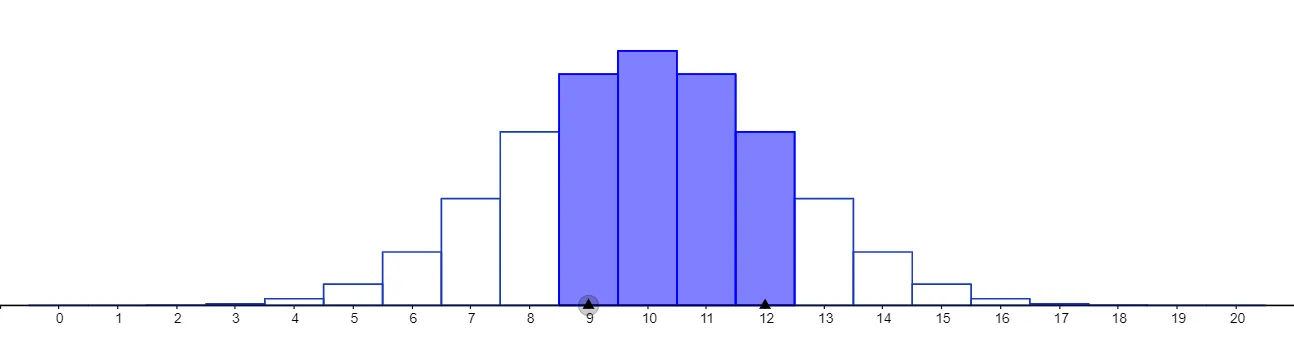
This example demonstrates how the binomial distribution changes with the number of trials and success probability, visualizing the discrete probability mass at each integer outcome and using min/max selection to highlight interval-related results (e.g., confidence/tail bounds depending on how the thresholds are set). The main mathematical ideas are the binomial distribution PMF, discrete probability distributions, and interval boundary selection via comparisons of probabilities or threshold values. Construction in GeoGebra uses Textfield to display labels (BinomialDist), Polygon to build the graphical representation of the distribution, Sequence to generate the sets of points/indices for plotting, and Min/Max to compute and update boundary choices from the computed probabilities. Key objects include the parameter inputs such as n and p, plus intermediate quantities (e.g., q1, q2 and other computed variables) that feed into the interval selection logic and update the visualization interactively. Suitable for high school through early undergraduate probability & statistics, especially for teaching binomial distributions, interactive parameter studies, and confidence-interval style reasoning.
GeoGebra Commands & Parameters
Textfield(n) → InputBox1Textfield(p) → InputBox2Textfield(a) → InputBox3Textfield(b) → InputBox4BinomialDist(n, p, c, false) → dPolygon((c - 0.49, 0), (c + 0.49, 0), (c + 0.49, d), (c - 0.49, d)) → q1, f, g, h, iBinomialDist(n, p, e, false) → oPolygon((e - 0.49, 0), (e + 0.49, 0), (e + 0.49, o), (e - 0.49, o)) → q2, j, k, l, mSequence(20, 20, 0, 20) →Min(x(Point[xAxis]) + 1.5, x(Point[xAxis]) + 1.5) →Max(x(Point[xAxis]) + 1.5, x(Point[xAxis]) + 1.5) →
AI Drawing Prompt Reference
Create an interactive visualization of the binomial distribution's probability mass function. The horizontal axis represents possible numbers of successes, and the vertical axis represents probability. Use four input fields to control the number of trials, success probability, and two threshold values for interval selection. For each integer outcome, draw a rectangle centered at that integer with width 0.98 and height equal to the binomial probability of that outcome. Highlight two specific outcomes with distinct colors to indicate interval boundaries selected by the thresholds. All rectangles together form the distribution's shape and update dynamically as parameters change.
The prompt above was compiled from the original drawing commands and is for reference only.