
Fractal Geometry & Trigonometry Interactive Demo
Loading the math board and drawing, please wait…
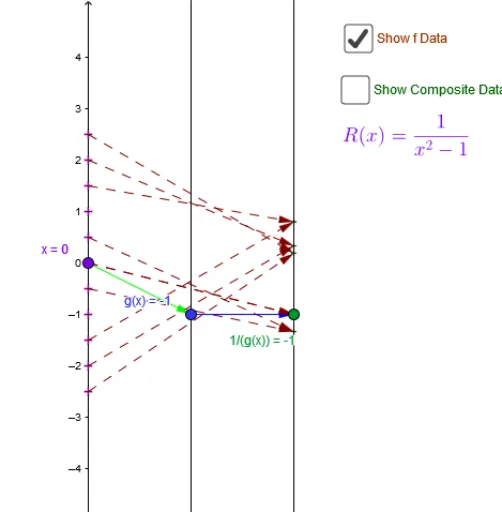
This example demonstrates dynamic geometric phenomena combining fractal geometry with trigonometric functions, showcasing complex pattern formation through reflection and line segment constructions. Core math concepts include fractal geometry, trigonometry, reflection, line segments, circumcircle, etc. Construction highlights from the GeoGebra command summary involve Point, Vector, Textfield, Segment, Sequence, Zip, and other objects. Suitable for high school and above learners to understand the correlation between complex geometric constructions and function graphs, enhancing spatial imagination and logical reasoning skills.
GeoGebra Commands & Parameters
Point(yAxis) → A_xVector(A_x, B) → uVector(B, C) → vTextfield(f1) → inputBox1Textfield(f2) → inputBox2Vector(C, D) → wTextfield(f3) → inputBox3Textfield(A) → inputBox4_1Segment(Pole, Asym) → iVector(A_{xs}, A_{f(xs)}) → jSegment(P, hfg_x) → mVector(A_x, C) → zSequence(0, num) → NZip(h + k - num / 4, k, N / 2) → x_*Zip(Vector[P, Q], P, xmd_*, Q, umd_*) → uarr_*Zip(Vector[P, Q], P, umd_*, Q, ymd_*) → yarr_*Zip(Vector[P, Q], P, xmd_*, Q, ymd_*) → xyarr_*Zip((P, Q), P, x_*, Q, y_*) → xyPT_*
AI Drawing Prompt Reference
Create a dynamic geometric figure combining fractal geometry and trigonometric functions, including point A, vectors u and v, text input boxes f1 to f3, line segment i, vectors j and m, and a series of vectors xyarr_*. Start by creating point A on the y-axis, then define vectors u and v, and use the text input boxes to input parameters for constructing line segment i and vectors j and m. Finally, use sequences and combinations to construct complex vectors xyarr_* and form a fractal pattern.
The prompt above was compiled from the original drawing commands and is for reference only.