
Fractal Curve 6
Loading the math board and drawing, please wait…
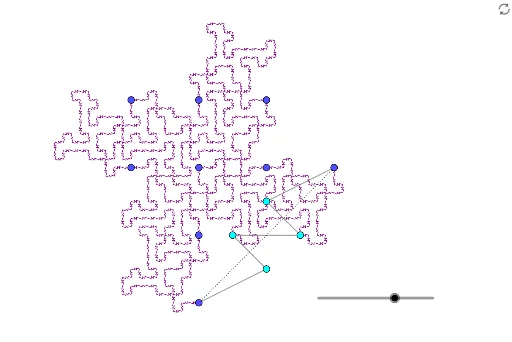
This example demonstrates the generation process of a fractal curve. It involves the core concepts of fractal geometry, using rotation and translation operations to create complex geometric shapes. The construction summary uses commands such as PolyLine, Rotate, Translate, and Segment. Suitable for high school and above students to learn fractal geometry and geometric construction.
GeoGebra Commands & Parameters
PolyLine(A, J, K, L, M, I) → fRotate(PolyLine[Dilate[A, 1 / sqrt(8), A], Dilate[J, 1 / sqrt(8), A], Dilate[K, 1 / sqrt(8), A], Dilate[L, 1 / sqrt(8), A], Dilate[M, 1 / sqrt(8), A], Dilate[I, 1 / sqrt(8), A]], π / 4, A) → A1Rotate(A1, π, B) → B1Rotate(B1, ((-π)) / 2, C) → C1Translate(A1, E - B) → D1Translate(C1, E - D) → E1Rotate(E1, π, F) → F1Rotate(F1, π / 2, G) → G1Translate(C1, H - D) → H1Rotate(Dilate[{A1, B1, C1, D1, E1, F1, G1, H1}, 1 / sqrt(8), A], π / 4, A) → A2Rotate(A2, π, B) → B2Rotate(B2, ((-π)) / 2, C) → C2Translate(A2, E - B) → D2Translate(C2, E - D) → E2Rotate(E2, π, F) → F2Rotate(F2, π / 2, G) → G2Translate(C2, H - D) → H2Rotate(Dilate[{A2, B2, C2, D2, E2, F2, G2, H2}, 1 / sqrt(8), A], π / 4, A) → A3Rotate(A3, π, B) → B3Rotate(B3, ((-π)) / 2, C) → C3Translate(A3, E - B) → D3Translate(C3, E - D) → E3Rotate(E3, π, F) → F3Rotate(F3, π / 2, G) → G3Translate(C3, H - D) → H3Rotate(Dilate[{A3, B3, C3, D3, E3, F3, G3, H3}, 1 / sqrt(8), A], π / 4, A) → A4Rotate(A4, π, B) → B4Rotate(B4, ((-π)) / 2, C) → C4Translate(A4, E - B) → D4Translate(C4, E - D) → E4Rotate(E4, π, F) → F4Rotate(F4, π / 2, G) → G4Translate(C4, H - D) → H4Segment(A, I) → g
AI Drawing Prompt Reference
Draw a fractal curve starting from points A, J, K, L, M, I, and use rotation and translation to gradually scale and rotate these points, rotating 45 degrees each time and then translating, repeat this process three times, and finally connect point A and I to form a line segment.
The prompt above was compiled from the original drawing commands and is for reference only.