
Four-bar Linkage Kinematics
Loading the math board and drawing, please wait…
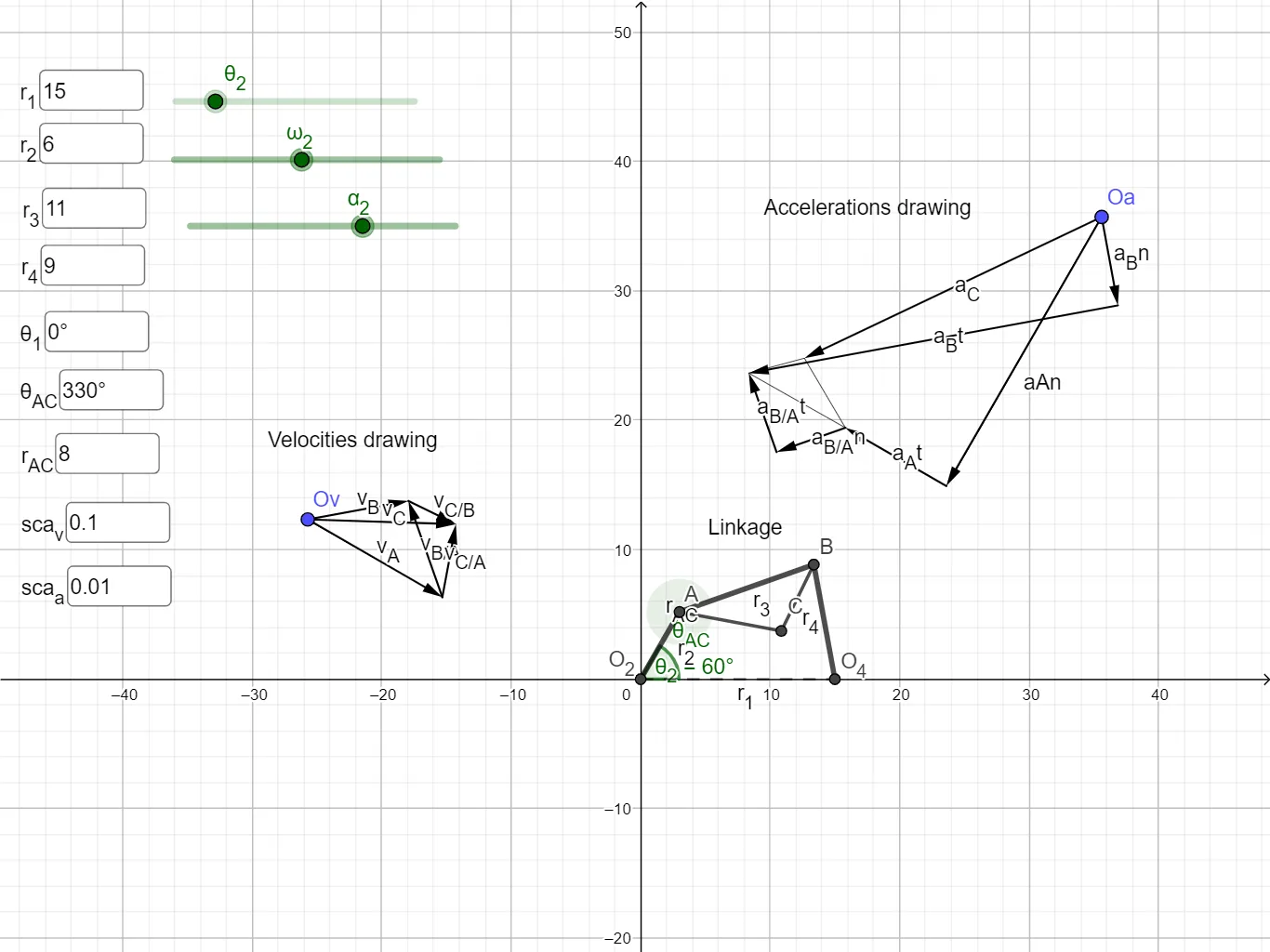
This example demonstrates the kinematics of a four-bar linkage, including velocity and acceleration diagrams. Key mathematical concepts include vectors and geometric transformations. Constructed using GeoGebra commands such as Intersect, Circle, Rotate, etc. Suitable for mechanical engineering and mathematics education.
GeoGebra Commands & Parameters
Intersect(xAxis, yAxis) → O_2Circle(O_2, r2) → circO2AIntersect(circO2A, xAxis, 2) → A_{old}Rotate(A_{old}, th2, O_2) → AVector(O_2, A) → pO2AVector(Ov, Ov + (((0, 0, w2) ⊗ pO2A) * scaleV)) → vACircle(O_2, r1) → circO2O4_{1}Intersect(circO2O4_{1}, xAxis, 2) → O4_{old}Rotate(O4_{old}, th1, O_2) → O_4Circle(O_4, r4) → circO4BCircle(A, r3) → circABIntersect(circO4B, circAB, 2) → BVector(A, B) → pABSegment(B, O_4) → L4OrthogonalLine(Ov, L4) → njSegment(A, B) → L3Point({Ov + vA}) → endVAOrthogonalLine(endVA, L3, xOyPlane) → niIntersect(ni, nj) → EVector(endVA, E) → vBATextfield(r1) → InputBox1Textfield(thAC) → InputBox2Textfield(r2) → InputBox3Textfield(r3) → InputBox4Textfield(r4) → InputBox5Textfield(rAC) → InputBox6Angle(A_{old}, O_2, A) → th2depSegment(O_2, A) → L2Textfield(th1) → InputBox7Circle(A, rAC) → circACIntersect(circAC, L3, 1) → C_{old}Rotate(C_{old}, thAC, A) → CAngle(C_{old}, A, C) → thACdepSegment(A, C) → LACSegment(C, B) → LCBVector(Ov, E) → vBVector(Oa, Oa + (((0, 0, w2) ⊗ ((0, 0, w2) ⊗ pO2A)) * scaleA)) → aAnVector(Oa + aAn, Oa + aAn + (((0, 0, dw2) ⊗ pO2A) * scaleA)) → aAtVector(Oa + aAn + aAt, Oa + aAn + aAt + (((0, 0, w3) ⊗ ((0, 0, w3) ⊗ pAB)) * scaleA)) → aBAnPoint({Oa + aAn + aAt + aBAn}) → endaBAnVector(O_4, B) → pO4BVector(Oa, Oa + (((0, 0, w4) ⊗ ((0, 0, w4) ⊗ pO4B)) * scaleA)) → aBnPoint({Oa, Oa + (((0, 0, w4) ⊗ ((0, 0, w4) ⊗ pO4B)) * scaleA)}) → endaBnOrthogonalLine(endaBn, L4, xOyPlane) → nmOrthogonalLine(endaBAn, L3, xOyPlane) → nnIntersect(nm, nn) → FVector(endaBn, F) → aBtVector(endaBAn, F) → aBAtTextfield(scaleV) → InputBox8Textfield(scaleA) → InputBox9Segment(O_2, O_4) → L1Vector(A, C) → pACVector(endVA, endVA + (scaleV * ((0, 0, w3) ⊗ pAC))) → vCAPoint({endVA + vCA}) → endVCAVector(Ov, endVCA) → vCVector(E, endVCA) → vCBVector(Oa + aAn + aAt, Oa + aAn + aAt + (((0, 0, w3) ⊗ ((0, 0, w3) ⊗ pAC)) * scaleA)) → aCAnVector(Oa + aAn + aAt + aCAn, Oa + aAn + aAt + aCAn + (((0, 0, dw3) ⊗ pAC) * scaleA)) → aCAtPoint({Oa + aAn + aAt + aCAn + aCAt}) → endaCAtVector(Oa, endaCAt) → aCPoint({Oa + aAn + aAt}) → endaASegment(F, endaA) → fSegment(endaA, endaCAt) → gSegment(F, endaCAt) → h
AI Drawing Prompt Reference
Draw a four-bar linkage kinematics diagram with velocity and acceleration diagrams. Start by plotting the intersection of coordinate axes, draw two circles centered at the origin, intersecting the axes to find points. Rotate one point to form a link. Then, draw circles centered at other points, find intersection points to determine connection points, and draw links and vectors. Finally, perform vector operations and geometric transformations to plot velocity and acceleration vectors, and label key parameters.
The prompt above was compiled from the original drawing commands and is for reference only.