
Forming Rectangles with Squares by Guillermo Bautista
Loading the math board and drawing, please wait…
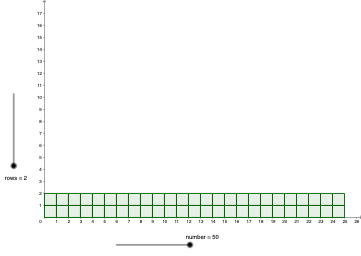
This example demonstrates how to form rectangles by combining multiple squares. It involves core math concepts like squares, rectangles, geometric distribution, and exponential functions. The construction uses GeoGebra commands Mod (modulus operation) and Sequence (sequence generation). Suitable for high school geometry teaching to understand the composition and transformation of geometric shapes.
GeoGebra Commands & Parameters
Mod(number, rows) → remSequence(Sequence[Polygon[(i, j), (i + 1, j), 4], i, 0, c - 1], j, 0, rows - 1) → l3, {{0.9999999999999999, 0.9999999999999999, 0.9999999999999998, 1, 0.9999999999999996, 1, 1, 1, 0.9999999999999991, 1, 1, 1, 1, 1, 1, 1, 0.9999999999999982, 1, 1, 1, 1, 1, 1, 1, 1}, {1, 1, 1, 1, 1, 1, 1, 1, 1, 1, 1, 1, 1, 1, 1, 1, 1, 1, 1, 1, 1, 1, 1, 1, 1}}Sequence(Polygon[(floor(c), i), (floor(c) + 1, i), 4], i, 0, rem - 1) → l2, {}
AI Drawing Prompt Reference
Create a geometric construction showing how to form a rectangle by combining multiple equal squares. Use a square polygon as the base unit and generate a grid-like arrangement on the plane with two nested layers: an outer layer grouped by the given number of rows, and an inner layer that places square polygons using an index range determined by the modulus remainder rem. Connect each square by using consecutive integer-coordinate points so the squares share edges consistently. Then include additional polygons formed from points whose x-coordinates relate to floor(c), using those vertices to complete the rectangle boundary and the internal square-composition structure.
The prompt above was compiled from the original drawing commands and is for reference only.