
Folding a Circle to Draw an Ellipse via Symmetry
Loading the math board and drawing, please wait…
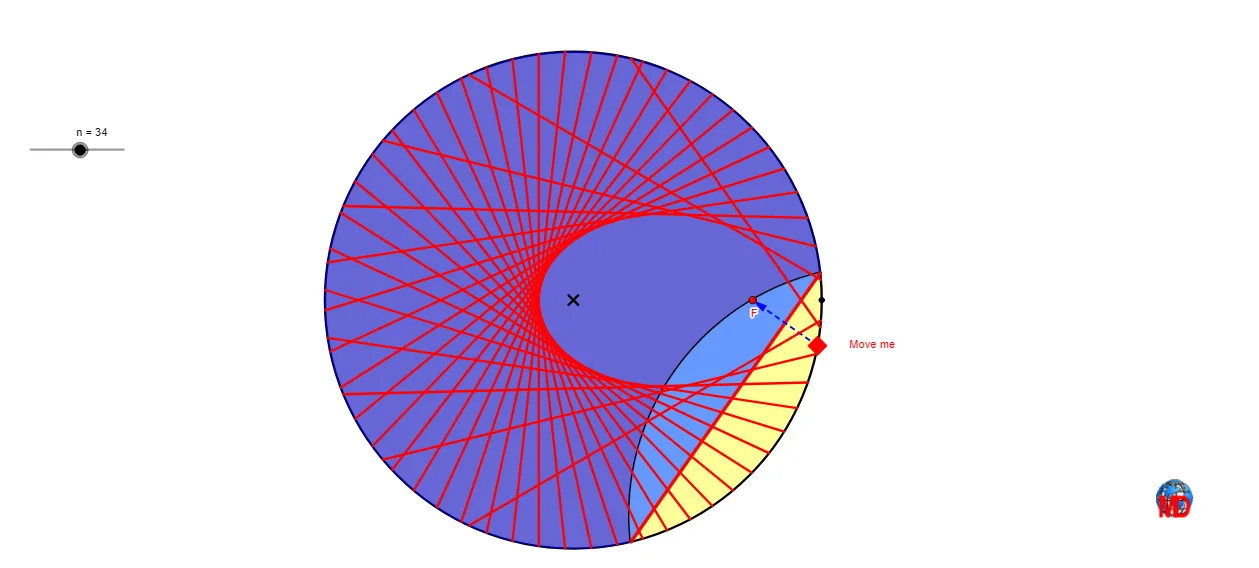
This example demonstrates how to draw an ellipse by “folding” a circle using geometric symmetry. It connects the ellipse’s characteristic construction with mirror operations, intersections, and arc-based point generation. The key math ideas are: circle/ellipse geometric relationships, transformations via reflection (Mirror), angle- and constraint-driven constructions, and continuity through systematic point sequencing. In GeoGebra, the workflow uses core commands such as Point (defining pivotal points), Mirror (creating folded/reflected counterparts), Circle (setting the base circle), Sequence (building an ordered set of steps/points), LineBisector (constructing symmetry-related lines), Intersect (finding intersection points of constructed objects), CircleArc and CircumcircleArc (generating arc geometry), Segment and Vector (for supporting constructions), Angle (imposing angle conditions), and Take (using computed selections). The construction objects include the center O, seed points on the circle (A and its reflected A'), intermediate points generated from arc/line intersections, and the resulting locus/curve traced from the ordered construction. Suitable for secondary school exploration, geometry construction lessons, and GeoGebra-based demonstrations of transformations and curve generation.
GeoGebra Commands & Parameters
Point(Ray[O, O + (1, 0)]) → AMirror(A, O) → A'Circle(O, A) → cPoint(Segment[A', A]) → FSequence(Rotate[A, ((2 * π / n) * i), O], i, 0, n - 1) → list1Point(list1) → PLineBisector(F, P) → aIntersect(c, a) → B, CCircleArc(O, C, B) → dSegment(B, C) → bCircumcircleArc(B, If[s ≟ 0, P, F], C) → gVector(P, F) → uSequence(Segment[Element[list1, i], F], i, 1, Length[list1]) → l1Sequence(Midpoint[Element[l1, i]], i, 1, Length[l1]) → l2Sequence(OrthogonalLine[Element[l2, i], Element[l1, i]], i, 1, Length[l1]) → l3Sequence(Segment[Intersect[c, Element[l3, i], 1], Intersect[c, Element[l3, i], 2]], i, 1, Length[l3]) → l4Angle(A, O, P) → αCircumcircleArc(B, F, C) → fTake(l4, 2, e) → l5Circle(O, A) → h
AI Drawing Prompt Reference
Draw an ellipse by folding a circle and using symmetry. Start by creating point A on the x-axis with O as the center. Reflect A to get A'. Draw a circle c with O as the center and A as the radius. Find the midpoint F of the line segment A'A. Generate a sequence of points P rotated around O. Find the perpendicular bisector a of F and P, and its intersection points B and C with circle c. Draw an arc d with B and C as endpoints. Use vector u starting from F. Through a series of construction steps, obtain a sequence of line segments l4, and the midpoints of these segments form the arc f, which is the desired ellipse.
The prompt above was compiled from the original drawing commands and is for reference only.