
Finding Unknown Values in Vertical Angles
Loading the math board and drawing, please wait…
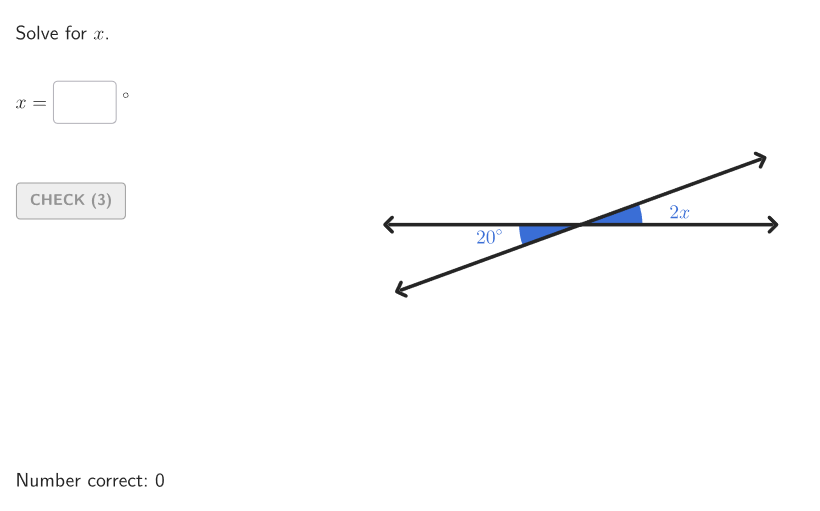
This example demonstrates how to calculate missing values in vertical angles using geometric constructions. Key mathematical concepts include properties of vertical angles, angle measurement, and algebraic solving. Construction involves using GeoGebra commands like Element, Angle, and Textfield to create vertical angle diagrams, with dynamic adjustments via If and Polygon commands. Suitable for 6-8 grade students for geometry practice and classroom demonstrations.
GeoGebra Commands & Parameters
Element(allCaseNum, Mod[countQuestion, Length[allCaseNum]] + 1) → caseNumShuffle(Sequence[t, t, 20, angBig - 10, 2]) → allAngMini2, {20, 152, 22, 158, 86, 104, 38, 96, 140, 80, 44, 154, 162, 138, 130, 58, 26, 144, 46, 108, 52, 34, 122, 136, 102, 112, 150, 64, 72, 164, 148, 74, 132, 88, 54, 160, 76, 156, 62, 30, 126, 90, 84, 36, 94, 168, 128, 92, 98, 120, 78, 142, 134, 116, 100, 70, 42, 110, 60, 32, 40, 28, 146, 50, 82, 66, 166, 114, 106, 56, 48, 170, 124, 68, 24, 118}Shuffle(Sequence[t, t, 21, angBig - 12, 3]) → allAngMini3, {21, 39, 147, 165, 105, 102, 45, 126, 123, 93, 60, 150, 162, 129, 153, 48, 72, 30, 81, 96, 84, 90, 33, 51, 24, 57, 135, 99, 138, 111, 114, 144, 78, 36, 117, 108, 63, 156, 75, 69, 132, 87, 120, 141, 168, 42, 66, 27, 54, 159}Element(allAngMini2, Mod[countQuestion, Length[allAngMini2]] + 1) → angMini2Element(allAngMini3, Mod[countQuestion, Length[allAngMini3]] + 1) → angMini3Rotate(A, If[caseNum ≟ 1, angMini2°, angMini3°], O) → BAngle(A, O, B) → angAOBTextfield(input1) → InputBox1TextToUnicode(("" * InputBox1)) → studUniCurrentRotate(A, angBig°, O) → AFAngle(B, O, AF) → angBOFIf(caseNum ≟ 1, angMini2 / 2, angMini3 / 3) → ans1Angle(A, O, AF) → bigATextfield(input2) → InputBox2Polygon(Zip[PixelsToPoint[Corner[1], Corner[3], Corner[5], A], A, {(pixelsLeft, pixelsTop), (pixelsLeft, y(Corner[5]) - pixelsBottom), Corner[5] - (pixelsRight, pixelsBottom), (x(Corner[5]) - pixelsRight, pixelsTop)}]) → borderBoxCorner(5) → layoutAppSizeonboardingTextOffset(Corner[onboardingText, 1], Corner[onboardingText, 3], onboardingCase, Corner[1], Corner[3], Corner[5]) → OnboardingTextOffsetElement({If[layoutX ≟ 16, layoutX - 5, 11], layoutX - 5}, layoutCase) → layoutHintSolnXPoint(Vector[(1.8 * UnitVector[AngularBisector[AA, O, BB]])], 1) → posLabelAOBPoint(Vector[(4.4 * UnitVector[AngularBisector[AA, O, AFF]])], 1) → posLabBigSegment(O, AF) → vertSegment(O, A) → horSegment(O, B') → angSidePoint(Vector[(1.8 * UnitVector[AngularBisector[B', O, AF]])], 1) → posLabelSol2Angle(A, O, B') → solCase1Point(Vector[(1.8 * UnitVector[AngularBisector[A, O, B']])], 1) → posLabelSol1Point(Vector[(2.2 * UnitVector[AngularBisector[BB, O, AFF]])], 1) → posLabelBOFMirror(B, O) → BOSegment(O, BO) → angSide2Angle(AF, O, BO) → angVertIf(showhint, 3, 0) → speedRotate(A, If[caseNum ≟ 1, ((2 * aniSli) * input1°), ((3 * aniSli) * input1°)], O) → SASegment(O, SA) → studSideAngle(A, O, SA) → studAng
AI Drawing Prompt Reference
Create a geometry diagram with a central vertex O and rays through points A and B. Draw a horizontal reference segment from O to A, and another ray from O passing through B. Mark and display the angle ∠AOB at O. Include a text input box for an unknown angle value (input1) and use it to define a rotated ray AF obtained by rotating A around O. Show angles involving AF such as ∠BOF and ∠AOF, and draw the segment from O to AF. Add the ray symmetric to B with respect to O to form a vertical-angle configuration, then mark the angle between AF and this symmetric ray, displaying the student answer area as a text field and keeping the diagram responsive to the entered value.
The prompt above was compiled from the original drawing commands and is for reference only.