
Finding Unknown Complementary Angles with Construction
Loading the math board and drawing, please wait…
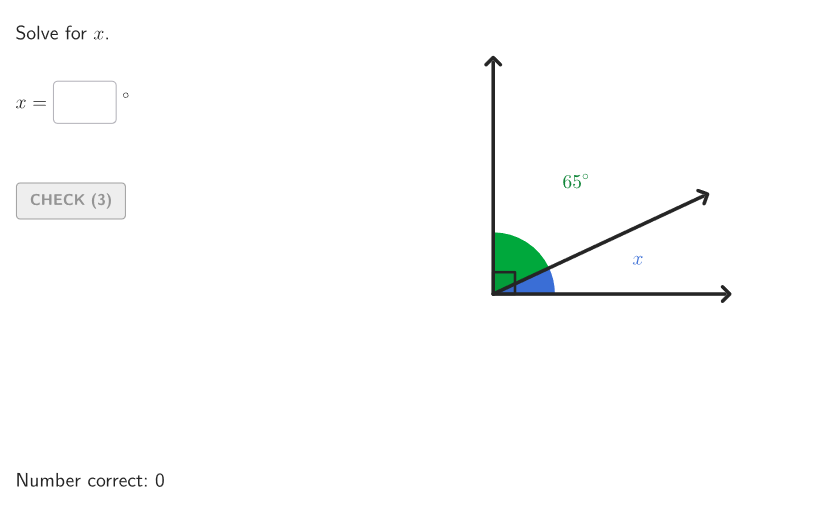
This GeoGebra lesson demonstrates how to find the missing measure when two angles are complementary (sum to 90°) by interactively constructing and measuring the relevant angles. It focuses on core angle concepts such as complementary angle relationships, angle measurement, and using angle/line properties to compute unknown values. The construction is built with GeoGebra commands and objects including Point, Segment, Angle, Polygon, and Rotate to create the angle arms and visualize changes; Textfield and TextToUnicode to display prompts and inputs; and Element plus If to control logic and answer checking. It also includes interactive elements like InputBox1/2, validate, showanswer, showsolution, btnValidate, and showhint to support student input, validation, and guided feedback, along with Shuffle and case-related counters (e.g., caseNum, tries) for varied practice. Designed for middle-school learners (grades 6–8) and for classroom practice on adjacent/vertical/complementary/supplementary angle problems.
GeoGebra Commands & Parameters
Shuffle(Sequence[t, t, 20, angBig - 25, 1]) → allAngMini, {25, 58, 32, 52, 20, 45, 56, 64, 21, 59, 27, 53, 36, 50, 44, 43, 38, 63, 54, 28, 39, 23, 61, 65, 62, 37, 40, 30, 55, 49, 60, 31, 24, 29, 33, 51, 42, 22, 46, 47, 57, 41, 35, 48, 34, 26}Element(allAngMini, Mod[countQuestion, Length[allAngMini]] + 1) → angMiniTextfield(input1) → InputBox1TextToUnicode(("" * InputBox1)) → studUniCurrentRotate(A, angMini°, O) → BRotate(A, angBig°, O) → AFAngle(B, O, AF) → angBOFAngle(A, O, AF) → bigATextfield(input2) → InputBox2Polygon(Zip[PixelsToPoint[Corner[1], Corner[3], Corner[5], A], A, {(pixelsLeft, pixelsTop), (pixelsLeft, y(Corner[5]) - pixelsBottom), Corner[5] - (pixelsRight, pixelsBottom), (x(Corner[5]) - pixelsRight, pixelsTop)}]) → borderBoxCorner(5) → layoutAppSizeonboardingTextOffset(Corner[onboardingText, 1], Corner[onboardingText, 3], onboardingCase, Corner[1], Corner[3], Corner[5]) → OnboardingTextOffsetElement({If[layoutX ≟ 16, layoutX - 5, 11], layoutX - 5}, layoutCase) → layoutHintSolnXAngle(A, O, B) → angAOBPoint(Vector[(1.8 * UnitVector[AngularBisector[AA, O, BB]])], 1) → posLabelAOBPoint(Vector[(1.8 * UnitVector[AngularBisector[BB, O, AFF]])], 1) → posLabelBOFPoint(Vector[(4.4 * UnitVector[AngularBisector[AA, O, AFF]])], 1) → posLabBigSegment(O, AF) → vertSegment(O, A) → horSegment(O, B') → angSidePoint(Vector[(1.8 * UnitVector[AngularBisector[B', O, AF]])], 1) → posLabelSol2Angle(A, O, B') → solCase1Point(Vector[(1.8 * UnitVector[AngularBisector[A, O, B']])], 1) → posLabelSol1Rotate(A, (aniSli * input1°), O) → SASegment(O, SA) → studSideIf(showhint, 3, 0) → speedAngle(A, O, SA) → studAng
AI Drawing Prompt Reference
Draw a geometric figure with a center point O and two rays forming a larger angle (angBig). Then rotate the ray AF around O to obtain point B, creating angle BOF. The figure should show complementary angle relationships, where the larger angle and smaller angle sum to 90 degrees. The construction order is: first draw the larger angle, then rotate to generate the smaller angle, and label key points to illustrate angle relationships. This figure is used to demonstrate measuring and calculating complementary angles.
The prompt above was compiled from the original drawing commands and is for reference only.