
Dynamic Illustration of Trig Ratios in a Right Triangle: Sine, Cosine, Tangent
Loading the math board and drawing, please wait…
In collections
Thinking Classroom Exploration: RT Trig (Solving for Sides)
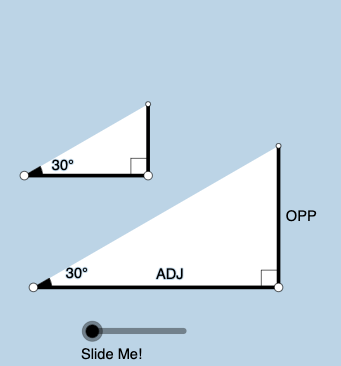
This example dynamically constructs a right triangle and lets a chosen angle (e.g., α/β) vary, showing how the sine, cosine, and tangent ratios update in sync with the triangle’s changing geometry. It highlights the geometric meaning of trig ratios: each function value corresponds to a specific ratio of opposite/adjacent/hypotenuse sides. Key concepts include right-triangle trigonometry, the Pythagorean relationship among side lengths, and the correspondence between an angle and its associated ratio. The construction uses GeoGebra commands such as Point and Segment to create and connect vertices, OrthogonalLine to form the right angle, Rotate (and RotateText) to animate the triangle and labels, Angle to measure/display the key angle, Ray/Circle/Intersect for auxiliary constructions and intersection points, Polygon to define the triangle region, Textfield to show computed values, and Midpoint for supporting geometry. Suitable for middle-school to early university instruction, especially lessons on trig functions and geometric construction, and for interactive classroom demonstrations.
GeoGebra Commands & Parameters
Point(Ray[A, A + (1, 0)]) → BSegment(A, B) → fOrthogonalLine(B, f) → gRotate(B, (a * pi / 180), A) → B'Angle(B, A, B') → αRay(A, B') → hCircle(B, 2) → cIntersect(c, g, 2) → CRay(B, C) → iIntersect(h, i) → DSegment(B, D) → jSegment(A, D) → kPolygon(A, B, D) → poly1, d, a_1, bRotate(B, If[0 < e ≤ 1, (-((e * (pi / 2 - α)))), α - pi / 2], D) → B'_1Rotate(D, If[0 < e ≤ 1, (-((e * (pi / 2 - α)))), α - pi / 2], D) → D'Segment(B'_1, D') → j'Rotate(A, If[0 < l ≤ 1, (α * l), α], A) → A'Rotate(B, If[0 < l ≤ 1, (α * l), α], A) → B'_2Segment(A', B'_2) → f'Rotate(B, If[0 < m ≤ 1, (m * pi / 2), pi / 2], B) → B'_3Rotate(D, If[0 < m ≤ 1, (m * pi / 2), pi / 2], B) → D'_1Segment(B'_3, D'_1) → j'_1Textfield(a) → InputBox1Angle(D, B, A) → βMidpoint(A, D) → ERotateText(text7, α) → text8Midpoint(A', B'_2) → FRotateText(text9, α) → text10Point(Ray[G, G + (1, 0)]) → HSegment(G, H) → tRotate(H, (a * pi / 180), G) → H'Ray(G, H') → f_1OrthogonalLine(H, t) → g_1Intersect(g_1, f_1) → IPolygon(G, H, I) → t1, i_1, g_2, h_1Angle(H, G, I) → γSegment(H, I) → j_1Rotate(H, If[0 < e ≤ 1, ((-e) * (pi / 2 - α)), (-(pi / 2 - α))], I) → H'_{1}Rotate(I, If[0 < e ≤ 1, ((-e) * (pi / 2 - α)), (-(pi / 2 - α))], I) → I'Segment(H'_{1}, I') → k_1Rotate(G, If[0 < l ≤ 1, (l * α), α], G) → G'Rotate(H, If[0 < l ≤ 1, (l * α), α], G) → H'_{2}Segment(G', H'_{2}) → t'Angle(I, H, G) → δRotate(H, If[0 < m ≤ 1, (m * pi / 2), pi / 2], H) → H'_{3}Rotate(I, If[0 < m ≤ 1, (m * pi / 2), pi / 2], H) → I'_{1}Segment(H'_{3}, I'_{1}) → l_1
AI Drawing Prompt Reference
Construct a dynamic right triangle with an adjustable acute angle, displaying sine, cosine, and tangent values in real time. The triangle has a horizontal base, a vertical leg, and a hypotenuse, with a clear right-angle marker. Include an auxiliary smaller triangle to illustrate side ratios as the angle changes. Show all side lengths and angle measures in text boxes that update with the angle slider. Add rotation animations to demonstrate the triangle's transformation while preserving its right-angle property.
The prompt above was compiled from the original drawing commands and is for reference only.