
Dynamic Illustration of Right-Triangle Trig Ratios (sin, cos, tan)
Loading the math board and drawing, please wait…
In collections
Thinking Classroom Exploration: RT Trig (Solving for Sides)
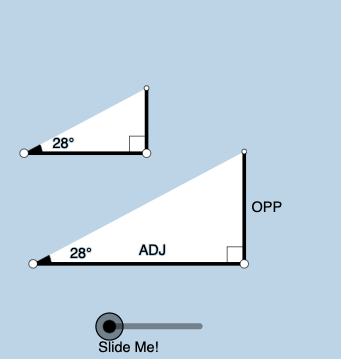
This example dynamically constructs a right triangle to show how the trigonometric ratios—sine, cosine, and tangent—change as the triangle’s position and the marked angle vary. It highlights the geometric meaning of trig functions by linking each ratio directly to the corresponding side lengths in a right triangle, emphasizing the “angle to side-ratio” relationship. The construction relies on key ideas such as right angles, angle measurement/annotation, rays and intersection points, and constrained geometry using circles. In GeoGebra, the figure is built with commands like Point and Segment for defining points and triangle edges, OrthogonalLine to enforce the right angle, Rotate and Angle to control the angle dynamically, Ray to represent angle directions, and Circle together with Intersect to determine dependent points and segment lengths. Textfield (and related text objects) are used to display the angle values and labels, supporting interactive learning. Suitable for middle and high school students studying trigonometry foundations, and for classroom demonstrations or guided exploration.
GeoGebra Commands & Parameters
Point(Ray[A, A + (1, 0)]) → BSegment(A, B) → fOrthogonalLine(B, f) → gRotate(B, (a * pi / 180), A) → B'Angle(B, A, B') → αRay(A, B') → hCircle(B, 2) → cIntersect(c, g, 2) → CRay(B, C) → iIntersect(h, i) → DSegment(B, D) → jSegment(A, D) → kPolygon(A, B, D) → poly1, d, a_1, bRotate(B, If[0 < e ≤ 1, (-((e * (pi / 2 - α)))), α - pi / 2], D) → B'_1Rotate(D, If[0 < e ≤ 1, (-((e * (pi / 2 - α)))), α - pi / 2], D) → D'Segment(B'_1, D') → j'Rotate(A, If[0 < l ≤ 1, (α * l), α], A) → A'Rotate(B, If[0 < l ≤ 1, (α * l), α], A) → B'_2Segment(A', B'_2) → f'Rotate(B, If[0 < m ≤ 1, (m * pi / 2), pi / 2], B) → B'_3Rotate(D, If[0 < m ≤ 1, (m * pi / 2), pi / 2], B) → D'_1Segment(B'_3, D'_1) → j'_1Textfield(a) → InputBox1Angle(D, B, A) → βMidpoint(A, D) → ERotateText(text7, α) → text8Midpoint(A', B'_2) → FRotateText(text9, α) → text10Point(Ray[G, G + (1, 0)]) → HSegment(G, H) → tRotate(H, (a * pi / 180), G) → H'Ray(G, H') → f_1OrthogonalLine(H, t) → g_1Intersect(g_1, f_1) → IPolygon(G, H, I) → t1, i_1, g_2, h_1Angle(H, G, I) → γSegment(H, I) → j_1Rotate(H, If[0 < e ≤ 1, ((-e) * (pi / 2 - α)), (-(pi / 2 - α))], I) → H'_{1}Rotate(I, If[0 < e ≤ 1, ((-e) * (pi / 2 - α)), (-(pi / 2 - α))], I) → I'Segment(H'_{1}, I') → k_1Rotate(G, If[0 < l ≤ 1, (l * α), α], G) → G'Rotate(H, If[0 < l ≤ 1, (l * α), α], G) → H'_{2}Segment(G', H'_{2}) → t'Angle(I, H, G) → δRotate(H, If[0 < m ≤ 1, (m * pi / 2), pi / 2], H) → H'_{3}Rotate(I, If[0 < m ≤ 1, (m * pi / 2), pi / 2], H) → I'_{1}Segment(H'_{3}, I'_{1}) → l_1
AI Drawing Prompt Reference
Draw a dynamic right triangle with an adjustable acute angle to illustrate sine, cosine, and tangent ratios. Start with a horizontal base segment, construct a perpendicular line at one endpoint, then rotate the other endpoint around the first to create a variable angle. Use a ray from the first endpoint and the perpendicular to find the third vertex, forming the triangle. Label the angle and side lengths. Additionally, create a similar triangle nearby, using rotations and scaling to show how side ratios change with the angle, and include an input box to change the angle interactively.
The prompt above was compiled from the original drawing commands and is for reference only.