
Dynamic Right-Triangle Trigonometry Ratios: Sine, Cosine, Tangent
Loading the math board and drawing, please wait…
In collections
Thinking Classroom Exploration: RT Trig (Solving for Sides)
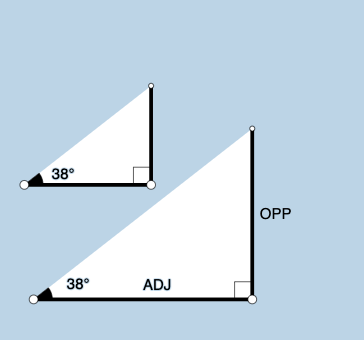
This GeoGebra example dynamically demonstrates how the trigonometric ratios of a right triangle—sine, cosine, and tangent—change as a chosen acute angle varies (via rotation). It highlights the geometric interpretation of trig functions as ratios of corresponding side lengths, reinforcing the connection between angle measure and side proportions. Key concepts include right-triangle trigonometry, angle measurement, and ratio-based relationships. Construction is built with interactive geometry commands and objects such as Point, Segment, OrthogonalLine (to maintain the right angle), Rotate (to drive angle changes), Angle (to define/measure the angle), Ray (direction elements), Circle (auxiliary constructions), Intersect (computing key intersection points), Polygon (forming the triangle), Textfield (displaying inputs/labels), Midpoint (supporting proportional constructions when needed), and RotateText (keeping angle/ratio annotations aligned during rotation). Suitable for secondary school students learning trig for the first time and for early university geometry/trigonometry instruction focused on dynamic visualization.
GeoGebra Commands & Parameters
Point(Ray[A, A + (1, 0)]) → BSegment(A, B) → fOrthogonalLine(B, f) → gRotate(B, (a * pi / 180), A) → B'Angle(B, A, B') → αRay(A, B') → hCircle(B, 2) → cIntersect(c, g, 2) → CRay(B, C) → iIntersect(h, i) → DSegment(B, D) → jSegment(A, D) → kPolygon(A, B, D) → poly1, d, a_1, bRotate(B, If[0 < e ≤ 1, (-((e * (pi / 2 - α)))), α - pi / 2], D) → B'_1Rotate(D, If[0 < e ≤ 1, (-((e * (pi / 2 - α)))), α - pi / 2], D) → D'Segment(B'_1, D') → j'Rotate(A, If[0 < l ≤ 1, (α * l), α], A) → A'Rotate(B, If[0 < l ≤ 1, (α * l), α], A) → B'_2Segment(A', B'_2) → f'Rotate(B, If[0 < m ≤ 1, (m * pi / 2), pi / 2], B) → B'_3Rotate(D, If[0 < m ≤ 1, (m * pi / 2), pi / 2], B) → D'_1Segment(B'_3, D'_1) → j'_1Textfield(a) → InputBox1Angle(D, B, A) → βMidpoint(A, D) → ERotateText(text7, α) → text8Midpoint(A', B'_2) → FRotateText(text9, α) → text10Point(Ray[G, G + (1, 0)]) → HSegment(G, H) → tRotate(H, (a * pi / 180), G) → H'Ray(G, H') → f_1OrthogonalLine(H, t) → g_1Intersect(g_1, f_1) → IPolygon(G, H, I) → t1, i_1, g_2, h_1Angle(H, G, I) → γSegment(H, I) → j_1Rotate(H, If[0 < e ≤ 1, ((-e) * (pi / 2 - α)), (-(pi / 2 - α))], I) → H'_{1}Rotate(I, If[0 < e ≤ 1, ((-e) * (pi / 2 - α)), (-(pi / 2 - α))], I) → I'Segment(H'_{1}, I') → k_1Rotate(G, If[0 < l ≤ 1, (l * α), α], G) → G'Rotate(H, If[0 < l ≤ 1, (l * α), α], G) → H'_{2}Segment(G', H'_{2}) → t'Angle(I, H, G) → δRotate(H, If[0 < m ≤ 1, (m * pi / 2), pi / 2], H) → H'_{3}Rotate(I, If[0 < m ≤ 1, (m * pi / 2), pi / 2], H) → I'_{1}Segment(H'_{3}, I'_{1}) → l_1
AI Drawing Prompt Reference
This is a dynamic graphic that demonstrates the trigonometric ratios of a right triangle. A fixed right triangle is shown, with one vertex rotated to change the acute angle. As the angle changes, the side length ratios also change, and the sine, cosine, and tangent values are displayed in real time. Users can interact to adjust the angle and observe how the ratios change. The graphic includes points, line segments, perpendicular lines, circles, intersection points, polygons, and text annotations to visually illustrate the relationship between angles, side lengths, and trigonometric functions.
The prompt above was compiled from the original drawing commands and is for reference only.