
Finding Quadratic Equation Roots Graphically
Loading the math board and drawing, please wait…
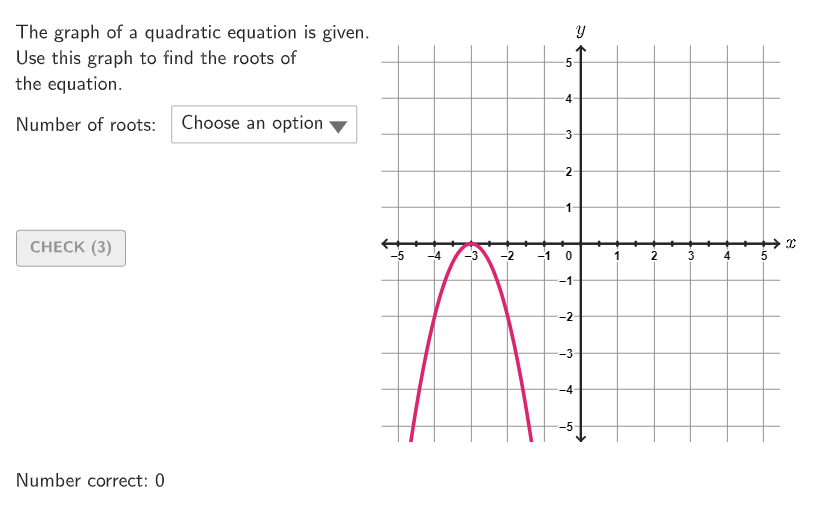
This activity demonstrates how to find the roots of a quadratic equation by graphing. The key mathematical concepts involve the relationship between quadratic equations and their function graphs. Construction uses GeoGebra commands like Polynomial, Segment, and PointToPixels to create the quadratic function and coordinate points. Suitable for students in grades 9-12 for algebraic practice.
GeoGebra Commands & Parameters
Shuffle(Sequence[A / 100, A, 0, 100]) → allRandomSeeds, {0.26, 1, 0.33, 0.95, 0.89, 0.17, 0.14, 0.03, 0.92, 0.76, 0.56, 0.68, 0.11, 0.19, 0.22, 0, 0.13, 0.99, 0.07, 0.43, 0.74, 0.93, 0.12, 0.81, 0.59, 0.82, 0.94, 0.36, 0.6, 0.58, 0.4, 0.62, 0.7, 0.52, 0.38, 0.35, 0.29, 0.72, 0.9, 0.34, 0.91, 0.53, 0.46, 0.75, 0.18, 0.84, 0.61, 0.79, 0.23, 0.1, 0.16, 0.08, 0.88, 0.2, 0.25, 0.65, 0.67, 0.86, 0.45, 0.98, 0.5, 0.66, 0.39, 0.42, 0.78, 0.28, 0.32, 0.05, 0.8, 0.73, 0.55, 0.41, 0.69, 0.04, 0.37, 0.97, 0.71, 0.24, 0.01, 0.54, 0.85, 0.49, 0.63, 0.09, 0.77, 0.48, 0.3, 0.44, 0.47, 0.64, 0.21, 0.51, 0.31, 0.15, 0.02, 0.06, 0.27, 0.87, 0.83, 0.57, 0.96}Take(allRandomSeeds, randIndex, randIndex + numRandoms - 1) → currentRandomSeedsIf(currentRandomSeeds(3) ≤ 0.2, 0, If[currentRandomSeeds(3) ≤ 0.6, 1, 2]) → NumOfSolsIf(-4 + floor((currentRandomSeeds(2) * 8)) ≠ 0, -4 + floor((currentRandomSeeds(2) * 8)), 1) → yVKeepIf(abs(x) ≥ abs(yV) / (5 - abs(xV))^(2), Sequence[-5, 5] \ {0}) → coeffsAElement(coeffsA, Mod[floor((currentRandomSeeds(3) * 10)), Length[coeffsA]] + 1) → coeffASequence(xA + (0.5 * ii), ii, 1, Min[10 - (2 * xA), 6]) → xBPos, {-2.5, -2, -1.5, -1, -0.5, 0}Element(xBPos, xBind) → xBKeepIf(abs(x) ≤ 20 / (xB - xA)^(2), Sequence[-4, 4, If[Mod[Denominator[(xA * xB)], 2] ≟ 0 ∨ Mod[Denominator[xA + xB], 2] ≟ 0, 2, 1]] \ {0}) → coeffsA2Element(coeffsA2, Mod[floor((currentRandomSeeds(3) * 10)), Length[coeffsA2]] + 1) → coeffA2Zip((("$\textsf{" * tt) * " }$"), tt, options) → menuSelectedIndex(menu) → selectedOptionPolynomial(Element[{g0, g1, g2}, NumOfSols + 1]) → gRemoveUndefined({Root[g]}) → solsIf(Length[sols] ≥ 2, (abs(input2 - x(sols(1))) ≤ 0.1 ∨ abs(input2 - x(sols(2))) ≤ 0.1) ∧ input2 ≠ input1, ¬Defined[input2]) → correct3If(Length[sols] ≥ 1, abs(input1 - x(sols(1))) ≤ 0.1 ∨ abs(input1 - x(sols(2))) ≤ 0.1, ¬Defined[input1]) → correct2Take({selectedOption, input1, input2}, 1, selectedOption - 1) → inputCurrentTextfield(input1) → InputBox1Textfield(input2) → InputBox2Corner(5) → layoutAppSizesectorPixels(A, B, C, haloPixels + 40, Corner[1], Corner[3], Corner[5]) → pulsingObjectsectorPixels(A, B, C, 40, Corner[1], Corner[3], Corner[5]) → displayAnglePointToPixels(Corner[onboardingDisplayText, 2], Corner[1], Corner[3], Corner[5]) → layoutOnboardingonboardingTextOffset(Corner[onboardingText, 1], Corner[onboardingText, 3], onboardingCase, Corner[1], Corner[3], Corner[5]) → OnboardingTextOffsetPolygon({(-5.5, -5.5), (5.5, -5.5), (5.5, 5.5), (-5.5, 5.5)}) → q1LaTeX(g, true, true) → text1Segment((-5.42, 0), (5.415, 0)) → hSegment((0, -5.42), (0, 5.42)) → iText("\math{x}", (5.75, 0.075), true, true, 0, 0) → labelxText("\math{y}", (0, 5.9), true, true, 0, 0) → labelyTranslate(p, Vector[(Vector[Corner[1], Corner[4]] / 500 * 16)]) → p'Element({348, 282, 284, 300}, selectedOption) → xFB1Text(sols(2), sols(2), true, true, 1, If[If[NumOfSols ≟ 2, coeffA2 ≥ 0, coeffA ≥ 0], -1, 1]) → label2Text(sols(1), sols(1), true, true, If[NumOfSols ≟ 1, 0, -1], If[If[NumOfSols ≟ 2, coeffA2 ≥ 0, coeffA ≥ 0], -1, 1]) → label1Sequence(Segment[(ii, -0.05), (ii, 0.05)], ii, -5, 5, 0.5) → l1
AI Drawing Prompt Reference
Draw a parabola that opens upwards and intersects the x-axis at two points. Label the x-axis and y-axis, and mark the points where the parabola intersects the x-axis.
The prompt above was compiled from the original drawing commands and is for reference only.