
Finding Percentage Using Tape Diagrams
Loading the math board and drawing, please wait…
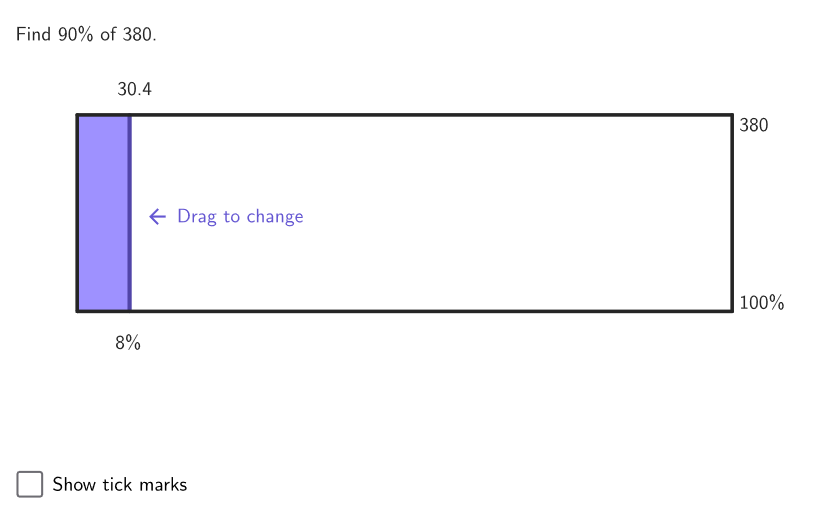
This example demonstrates how to calculate the percentage of a number using a tape diagram. Key mathematical concepts include percentage calculation, proportional reasoning, and graphical representation. Construction involves GeoGebra commands such as Shuffle, Intersect, Polygon, and others to create the diagram. Suitable for students in grades 6-8 to explore real-world applications like discounts, taxes, and interest.
GeoGebra Commands & Parameters
Shuffle(Sequence[(20 * k), k, 1, 25]) → allNum, {300, 460, 480, 360, 100, 160, 440, 380, 240, 280, 80, 320, 220, 400, 500, 180, 420, 340, 20, 60, 260, 140, 120, 200, 40}Intersect(xAxis, yAxis) → APolygon(B, C, (0, y(C)), (0, y(B))) → tapePoly, g, h, i, jPolygon(A, E, F, D) → framePoly, a_1, e, f, d_1Shuffle(Sequence[(5 * k), k, 1, 19]) → allPerc, {35, 65, 25, 55, 30, 20, 75, 90, 70, 50, 95, 15, 10, 45, 5, 80, 60, 40, 85}Element(allPerc, Mod[count, Length[allPerc]] + 1) → percElement(allNum, Mod[count, Length[allNum]] + 1) → numPolygon(allPercCorners) → framePercPolygon(allNumCorners) → frameNumSequence(Segment[(t, y(A) - 0.05), (t, y(A) + 0.05)], t, x(A) + Distance[A, E] / 10, x(E) - Distance[A, E] / 10, Distance[A, E] / 10) → shortTicksexpandSegment(B, C, (7 * pulsing), Corner[1], Corner[3], Corner[5]) → pulsingObject
AI Drawing Prompt Reference
Draw a bar chart to demonstrate percentage calculation. The chart should include two bar charts: one for original values and one for percentages. The bar charts should be placed side by side, with bar lengths representing the values. A frame and tick marks should be added to show proportional relationships. The construction order is: first draw the bar charts, then add the frame and tick marks, and finally adjust the bar lengths to reflect the percentage relationship.
The prompt above was compiled from the original drawing commands and is for reference only.