
Finding Missing Values in Percentage Relationships Using Tape Diagrams
Loading the math board and drawing, please wait…
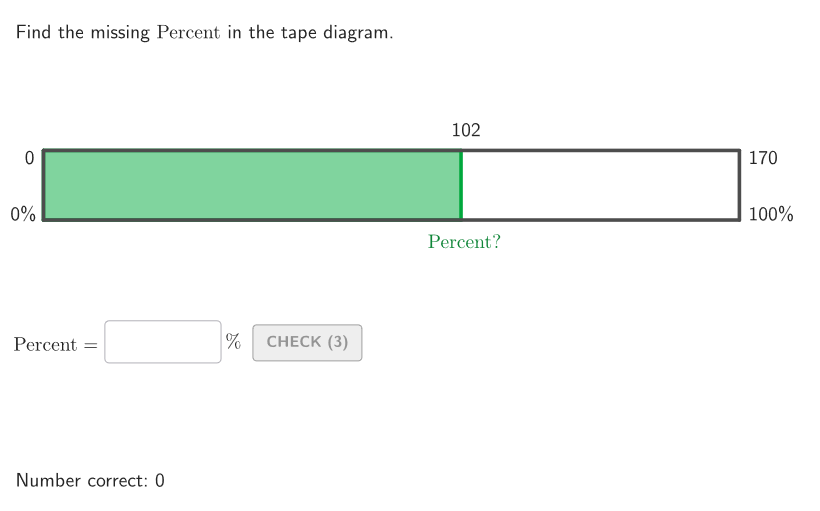
This example demonstrates how to use tape diagrams to find missing values in percentage relationships, including the missing whole, part, or percent. The core mathematical concepts involve understanding the definition of percentage, part-to-whole proportional relationships, and geometric visualization of percentages. Construction highlights: Uses Polygon command to draw tape diagram frames, creates interactive input boxes via Textfield and InputBox for user answers, generates random practice problems with Sequence and Random commands, incorporates validate function for answer checking and showanswer for solution display. This resource is suitable for grade 6-8 students to practice calculating and estimating percentages, applicable for classroom instruction or homework review, helping students develop number sense and percentage thinking.
GeoGebra Commands & Parameters
Shuffle(Sequence[t, t, 20, 200, 10]) → allWhole, {170, 110, 160, 50, 40, 150, 200, 130, 120, 70, 90, 140, 60, 20, 180, 80, 100, 30, 190}Shuffle(Sequence[t, t, 6, 80, 1]) → allPerc, {60, 79, 38, 13, 59, 11, 36, 78, 33, 73, 55, 14, 46, 67, 22, 53, 68, 63, 74, 75, 39, 54, 8, 28, 20, 69, 16, 65, 56, 24, 70, 35, 77, 41, 34, 37, 44, 49, 45, 17, 25, 48, 72, 15, 61, 58, 80, 19, 10, 62, 66, 32, 40, 51, 23, 31, 50, 7, 6, 57, 43, 29, 52, 18, 47, 42, 21, 27, 76, 71, 30, 12, 64, 9, 26}Shuffle({1, 2, 3}) → allCases, {3, 1, 2}Element(allCases, Mod[countQuestion, Length[allCases]] + 1) → caseNumElement(allWhole, Mod[countQuestion, Length[allWhole]] + 1) → wholeElement(allPerc, Mod[countQuestion, Length[allPerc]] + 1) → percIsInteger(perc / 10) → multTenPercTextfield(input1) → InputBox1TextToUnicode(InputBox1 + "") → userUniSequence(Random[0, 99] / 100, A, 1, 200) → allRandomSeeds, {0.16, 0.19, 0.55, 0.31, 0.55, 0.84, 0.37, 0.15, 0.96, 0.17, 0.03, 0.83, 0.76, 0.19, 0.12, 0.57, 0.51, 0.98, 0.01, 0.31, 0.63, 0.06, 0.56, 0.48, 0.37, 0.5, 0.21, 0.14, 0.15, 0.26, 0.66, 0.68, 0.51, 0.69, 0.36, 0.44, 0.29, 0.09, 0.25, 0.46, 0.94, 0.59, 0.28, 0.63, 0.45, 0.36, 0.85, 0.08, 0.58, 0.07, 0.74, 0.15, 0.09, 0.02, 0.07, 0.12, 0.13, 0.82, 0.44, 0.86, 0.91, 0.66, 0.72, 0.18, 0.95, 0.4, 0.18, 0.93, 0.13, 0.04, 0.07, 0.33, 0.21, 0.83, 0.22, 0.01, 0.69, 0.92, 0.22, 0.61, 0.24, 0.58, 0.66, 0.74, 0.52, 0.25, 0.63, 0.47, 0.04, 0.71, 0.82, 0.1, 0.2, 0.83, 0.77, 0.11, 0.87, 0.01, 0.17, 0.34, 0.12, 0.25, 0.09, 0.25, 0.25, 0.22, 0.74, 0.96, 0.09, 0.43, 0.43, 0.4, 0.63, 0.16, 0.16, 0.43, 0.44, 0.64, 0.4, 0.97, 0.66, 0.4, 0.48, 0.25, 0, 0.84, 0.07, 0.64, 0.39, 0.74, 0.19, 0.92, 0.54, 0.07, 0.26, 0.9, 0.54, 0.14, 0.39, 0.24, 0.52, 0.24, 0.83, 0.52, 0.69, 0.7, 0.37, 0.82, 0.69, 0.06, 0.58, 0.9, 0.67, 0.61, 0.73, 0.15, 0.32, 0.1, 0.15, 0.77, 0.47, 0.4, 0.34, 0.37, 0.5, 0.86, 0.18, 0.67, 0.48, 0, 0.89, 0.73, 0.75, 0.99, 0.08, 0.55, 0.04, 0.5, 0.15, 0.83, 0.82, 0.56, 0.4, 0.21, 0.27, 0.53, 0.54, 0.13, 0.31, 0.56, 0.13, 0.1, 0.19, 0.48, 0.58, 0.47, 0.85, 0.39, 0.2, 0.57}Take(allRandomSeeds, randIndex, randIndex + numRandoms - 1) → currentRandomSeedsTextfield(input2) → InputBox2Polygon(Zip[PixelsToPoint[Corner[1], Corner[3], Corner[5], A], A, {(pixelsLeft, pixelsTop), (pixelsLeft, y(Corner[5]) - pixelsBottom), Corner[5] - (pixelsRight, pixelsBottom), (x(Corner[5]) - pixelsRight, pixelsTop)}]) → borderBoxCorner(5) → layoutAppSizeSegment(PMoveA, PMoveB) → displaySegmentexpandSegment(PMoveA, PMoveB, (pulsing * 7), Corner[1], Corner[3], Corner[5]) → pulsingObjectonboardingTextOffset(Corner[onboardingText, 1], Corner[onboardingText, 3], onboardingCase, Corner[1], Corner[3], Corner[5]) → OnboardingTextOffsetIf(caseNum ≟ 1, 90, caseNum ≟ 2, 75, 100) → positionInputXPolygon(A, B, C, D) → tape, a, b, c, dPolygon(A, AP, CP, D) → tapeBit, a_1, ap, cp, d_1Polygon(A, B, C, D) → tapeFrame, a_2, b_1, c_1, d_2Sequence((("" * t) * "\%"), t, 10, 90, 10) → allLabelsBenchDownSequence((x(A) + (t * factor), y(A) - 1), t, 1, 10, 1) → positionBenchDownZip(Text[("" * A), B, false, true, 0, 0], A, allLabelsBenchDown, B, positionBenchDown + (0.15, -0.2)) → labelsBenchDownSequence((whole * t / 10), t, 1, 9, 1) → allLabelsBenchUp, {17, 34, 51, 68, 85, 102, 118.99999999999999, 136, 153}Sequence((x(A) + (t * factor), y(D) + 1.5), t, 1, 9, 1) → positionBenchUpZip(Text[("" * A), B, false, true, 0, 0], A, allLabelsBenchUp, B, positionBenchUp) → labelsBenchUpSequence(Segment[(x(A) + (factor * t), y(A) + If[caseNum ≟ 3, -1, 0]), (x(A) + (t * factor), y(D) + If[caseNum ≟ 3, 0, 1])], t, 1, 9, 1) → allBench
AI Drawing Prompt Reference
Draw a tape diagram to illustrate percentage relationships and find missing values. Include a whole and a percentage, showing their relationship with the tape diagram. The tape diagram is divided into two parts, with percentage labels from 10% to 90% on the top and bottom. Randomly generate the whole value and percentage value, and display them next to the tape diagram. Use the polygon tool to draw the tape diagram, with different colors for the whole and part, and add dynamic effects.
The prompt above was compiled from the original drawing commands and is for reference only.