
Find the Center of a Given Circle by Construction
Loading the math board and drawing, please wait…
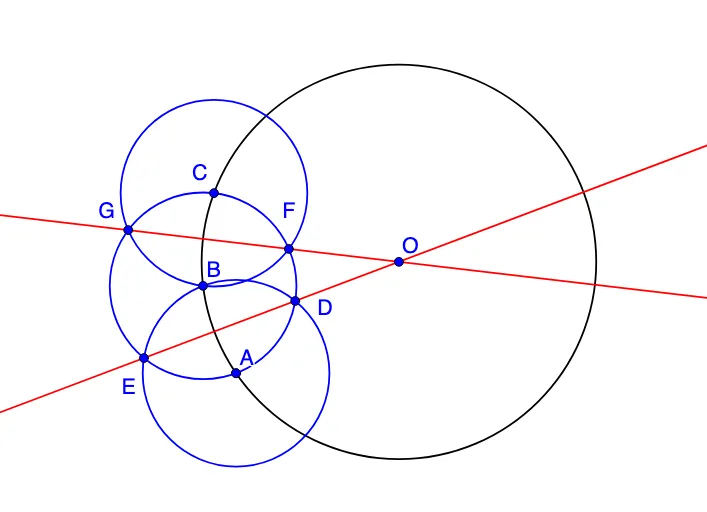
This GeoGebra example demonstrates how to determine the center of a known circle by using constructions based on chords formed by lines that intersect the circle. It highlights key geometry ideas such as the definition of a circle’s center, chord properties, and the symmetry relation that leads to the center being recoverable from intersection/constraint information. The construction uses GeoGebra commands Circle to create the given circle, Line to draw secant (or chord-forming) lines, and Intersect to compute the relevant intersection points. From the construction summary, objects like the circle (e.g., c/C and related constructed circles) and multiple points (e.g., A, B, D, E, F, G, plus indexed points such as A_1, C_1, D_1, F_1) are combined to obtain the circle’s center O. Suitable for middle-school geometry practice, geometry construction lessons, and student exploration of geometric constraint solving.
GeoGebra Commands & Parameters
Circle(A_1, A) → cCircle(A, C_1) → dIntersect(c, d) → D_1, B, ,Circle(B, A) → eIntersect(e, c) → F_1, C, ,Circle(C, B) → fIntersect(e, f) → G, F, ,Intersect(e, d) → D, E, ,Line(E, D) → aLine(G, F) → bIntersect(a, b) → O
AI Drawing Prompt Reference
Draw a known circle and use chord/chord-forming intersections to recover its center. Construct the required auxiliary circles from the circle and chosen points that generate two secant/chord directions. Compute their intersection points, then draw one line through the intersection points derived from one pair and a second line through the intersection points derived from the other pair. Mark the intersection of these two lines as the center. The final figure should show the given circle, the auxiliary circles, the key intersection points, and the two connecting lines leading to the center.
The prompt above was compiled from the original drawing commands and is for reference only.