
Find Angles
Loading the math board and drawing, please wait…
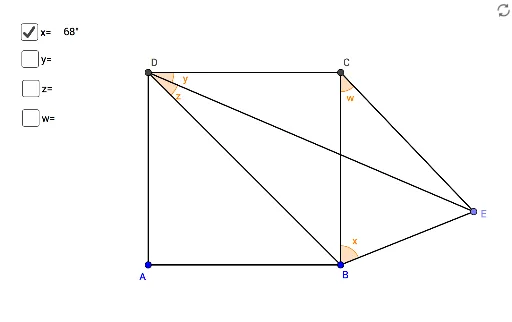
This example demonstrates how to find angles in a given geometric figure using GeoGebra. Key mathematical concepts include angle measurement. Commands used include Polygon, Circle, Point, Segment, and Angle. Suitable for middle school and above students to learn angle measurement and geometric construction.
GeoGebra Commands & Parameters
Polygon(A, B, 4) → poly1, f, g, h, i, C, DCircle(C, B) → cPoint(c) → ESegment(C, E) → jSegment(B, E) → kSegment(B, D) → lSegment(E, D) → mAngle(C, B, E) → αAngle(C, D, E) → βAngle(E, D, B) → γAngle(B, C, E) → δ
AI Drawing Prompt Reference
Draw a quadrilateral ABCD. Use point B as the center to draw a circle, which intersects the circumference at point E. Connect points C and E, B and E, B and D, and E and D. Measure the sizes of angles CBE, CDE, DEB, and EBD.
The prompt above was compiled from the original drawing commands and is for reference only.