
Find a Parabola’s Equation from Its Vertex and Focus (GeoGebra)
Loading the math board and drawing, please wait…
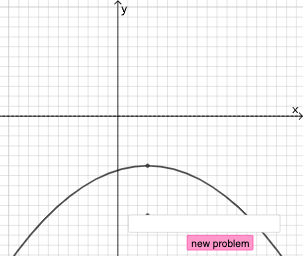
This example demonstrates how to construct and derive the equation of a parabola when the vertex and focus are given. It visualizes the defining property of a parabola: for any point on the curve, the distance to the focus equals the distance to the directrix. Key concepts include conic sections (parabolas), the vertex–focus parameterization, and coordinate-geometry reasoning that connects geometric constraints to the standard algebraic form of the equation. In GeoGebra, the construction uses objects and commands such as Point, Focus, Vertex, and Line/Directrix to set up the geometry, Distance to enforce the equal-distance condition, and Vector/Angle for orientation and directional relationships. Random, Sequence, and Union can be used to generate or manage dynamic points, while RotateText, Textfield, and Text help display parameters and the resulting equation during interaction. Suitable for late secondary school and introductory college students learning conic sections and graphing.
GeoGebra Commands & Parameters
Random(0, 1) → choiceRandomElement(Union[Sequence[i, i, -6, -0.5, 0.5], Sequence[i, i, 0.5, 6, 0.5]]) → j_1Random(-8, 8) → e_1Sequence(i, i, -10, -1, 1) → l1Sequence(i, i, 1, 10, 1) → l2Union(l1, l2) → l3RandomElement(l3) → i_1Point(Ray[A + (0, 1), A + (0, 2)]) → HDistance(A, H) → c_1Point(Ray[A + (1, 0), A + (2, 0)]) → EDistance(A, E) → d_1Point(Segment[(h + 1, y(C) + 10), (h + 1, y(C) - 10)]) → DLine(A, B) → fVector(A, C) → uPolygon(A, C, B) → t1, b, a_1, cSegment(A, C) → h_{1}Vector((h, 0), A) → wVector((0, 0), (h, 0)) → jDistance(A, E) → nVector(A, E) → vPoint(p) → FIntersect(eq1, q) → GPolygon(A, G, F) → t2, f_1, a_2, g_1Segment(F, A) → rSegment(A, G) → sSegment(G, F) → tAngle(A, G, F) → αRotateText(text18, pi / 2) → text20RotateText(text19, pi / 2) → text21Vector(A, H) → u_1RandomElement(l3) → k_1If(e_1 < 0, (x + e_1)^(2), (x - e_1)^(2)) → p_1If(e_1 < 0, text5, e_1 > 0, text4, text9) → text8If(j_1 < 0, text7, j_1 > 0, text6, text10) → text11If(choice ≟ 0, (x - e_1)^(2) = (r_1 * (y - i_1)), (y - i_1)^(2) = (r_1 * (x - e_1))) → eq2Center(eq2) → IVertex(eq2) → J, K, L, MTextfield(eq3) → InputBox1Focus(eq2) → N,Directrix(eq2) → s_1,
AI Drawing Prompt Reference
Create a geometric diagram for finding a parabola’s equation from its vertex and focus. Start by placing the vertex and the focus, then indicate the distance from the vertex to the focus. Add the directrix associated with that parabola, showing the directrix line that defines the equal-distance property. Introduce an auxiliary direction through the vertex and place points so that for each chosen point on the construction, its distance to the focus matches its distance to the directrix. Use these constraints to highlight the standard algebraic form of the parabola’s equation, and include labels/text showing the vertex–focus parameters and the resulting equation.
The prompt above was compiled from the original drawing commands and is for reference only.