
Ferris Wheel Animation: Sine Function and Trigonometric Relations
Loading the math board and drawing, please wait…
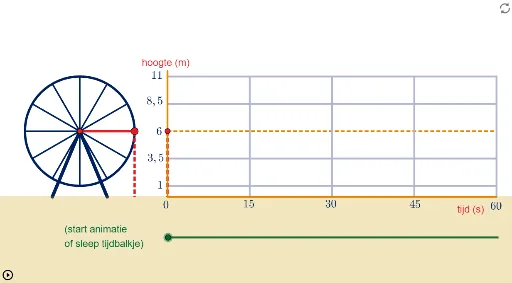
① This example presents an animated Ferris wheel that vividly demonstrates the correspondence between circular motion and the sine function, along with dynamic changes in right-triangle side-angle relationships. ② Core mathematical concepts include sine functions, trigonometric functions, right triangles, geometric properties of line segments and circles, and the use of random variables in simulation. ③ Construction highlights: using GeoGebra commands such as CurveCartesian for parametric curves, Segment and Sequence for generating spokes and points on the circle, sliders (t, p, r) to control rotation angle and radius, multiple text objects (tekst series) for real-time value display, and start/stop buttons for animation control. ④ Suitable for secondary school mathematics (especially trigonometry and geometry) teaching, classroom demonstrations, or student self-exploration, helping learners understand the relationship between the unit circle, sine waves, and rotational motion, and also serving as an introduction to random variables in probability and statistics.
GeoGebra Commands & Parameters
CurveCartesian(x(O_1) + (p * tt / ((2 * π))), y(O_1) + (r * sin(tt)), tt, 0, t) → ssinSegment(tijdlijn_A, tijdlijn_B) → tijdlijnSegment((x(O_1), y(O_1) - r), (x(O_1) + p, y(O_1) - r)) → hor_1Segment((x(O_1), y(O_1) - r / 2), (x(O_1) + p, y(O_1) - r / 2)) → hor_2Segment((x(O_1), y(O_1) + r / 2), (x(O_1) + p, y(O_1) + r / 2)) → hor_3Segment((x(O_1), y(O_1) + r), (x(O_1) + p, y(O_1) + r)) → hor_4Segment(O_1, (x(O_1) + p, y(O_1))) → as_7Segment(M_1, P_1) → dSegment(P_1, (x(P_1), -0.1)) → a_1Segment(S_1, (x(S_1), -0.1)) → aSegment((x(O_1), -0.1), (x(O_1) + p, -0.1)) → bSegment((x(O_1), -0.1), (x(O_1), y(O_1) + (1.1 * r))) → as_9Sequence(Segment[(x(M_1) + (r * cos((i / 6 * π) + t)), y(M_1) + (r * sin((i / 6 * π) + t))), M_1], i, 0, 12) → stralenSegment((x(O_1) + p / 2, -0.1), (x(O_1) + p / 2, y(O_1) + r)) → ver_1Segment((x(O_1) + (3 * p / 4), -0.1), (x(O_1) + (3 * p / 4), y(O_1) + r)) → ver_2Segment((x(O_1) + p, -0.1), (x(O_1) + p, y(O_1) + r)) → ver_3Segment((x(O_1) + p / 4, -0.1), (x(O_1) + p / 4, y(O_1) + r)) → ver_4
AI Drawing Prompt Reference
Draw an animated Ferris wheel that illustrates the relationship between circular motion and the sine function. On the left, a circle with adjustable radius has multiple spokes radiating from its center, rotating with an angle slider. A point on the circle drops a vertical line to a horizontal baseline, and a sine curve extends to the right, mapping the rotation angle to the vertical position. Add horizontal and vertical reference lines forming a grid, with projections of key points. Include sliders for rotation angle and radius, plus play/pause buttons, and display real-time values for angle and sine.
The prompt above was compiled from the original drawing commands and is for reference only.