
Exploring Rational Linear Functions: Effects of Parameters a, b, c, d on f(x)=(a
Loading the math board and drawing, please wait…
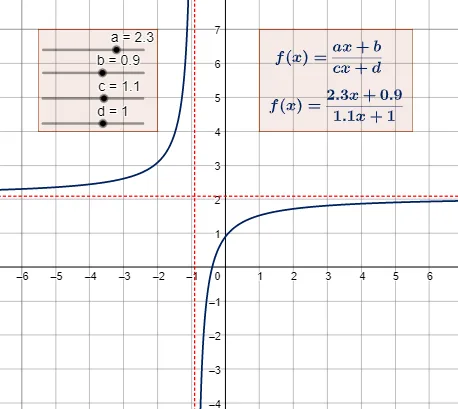
This GeoGebra example dynamically demonstrates how changing parameters a, b, c, and d affects the graph of the rational linear function f(x)=(ax+b)/(cx+d). The core mathematical concepts include the properties of fractional linear functions (also known as Möbius transformations or hyperbolic functions), such as vertical asymptotes (where the denominator equals zero), horizontal asymptotes (determined by the ratio of leading coefficients), and transformations like translation, scaling, and reflection. The construction uses sliders to control parameters a, b, c, d, and employs the Polygon command to create auxiliary polygons (e.g., asymptote guides or reference rectangles). Text objects (tekst1, tekst2) display current parameter values. Multiple objects (f, e, g, h, i, j, k, l, m, n, p) are used to mark asymptotes, intersection points, or special features. This resource is ideal for high school mathematics lessons on function transformations and rational functions, as well as introductory calculus for pre-university students, providing an intuitive visual understanding of how parameter changes alter the graph's shape and position.
GeoGebra Commands & Parameters
Polygon((1, 4), (5.5, 4), (5.5, 7), (1, 7)) → veelhoek1, h, i, j, kPolygon((-5.5, 4), (-2, 4), (-2, 7), (-5.5, 7)) → veelhoek2, l, m, n, p
AI Drawing Prompt Reference
Draw a coordinate plane showing the graph of a rational linear function of the form (ax+b)/(cx+d). Add two auxiliary rectangles on the graph: one on the right with corners approximately at (1,4), (5.5,4), (5.5,7), and (1,7); another on the left with corners at (-5.5,4), (-2,4), (-2,7), and (-5.5,7). These rectangles help visualize asymptotes or transformations. Also mark vertical and horizontal asymptotes, any intersection points or special features, and display current parameter values as text. The overall graph should clearly illustrate how changing parameters affects the function's shape.
The prompt above was compiled from the original drawing commands and is for reference only.