
Factor Expressions with Exponents
Loading the math board and drawing, please wait…
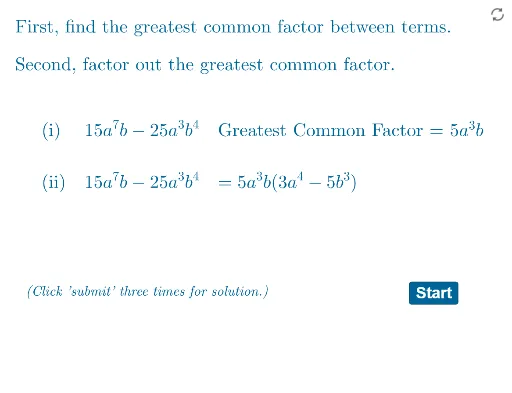
This example demonstrates how to factor algebraic expressions with exponents. Key mathematical concepts include exponent operations and factoring. Using GeoGebra commands such as Random, RandomElement, and Factor, the process of factoring can be dynamically displayed. Suitable for students in middle school and above learning algebra.
GeoGebra Commands & Parameters
Random(1, 6) → eg1Random(0, 2) → exp4RandomElement(listm) → cnRandom(1, 3) → exp1Random(0, 3) → exp3Remove(listp, {0, 0, 0, 0, 0, 0}) → listp2RandomElement(listp2) → c1Remove(listp2, {c1}) → listp3RandomElement(listp3) → c2Expand(Simplify[g]) → g0GCD(cf1, cf2) → cNMin(eg1, eg3) → gaexpMin(eg2, eg4) → gbexpRandom(0, 1) → questionSimplify(g1) → g11Random(1, 3) → exp2Random(1, 3) → e1Min(fexplist) → fminxRandomElement(listp) → c3RandomElement(listp) → c4Expand(Simplify[(cf1 * x^(e1)) + (cf2 * x^(e2)) + (cf3 * x^(e3)) + (cf4 * x^(e4))]) → fCoefficients(f) → fcoeflistGCD(fcoeflist) → fgcdIf(Element[fcoeflist, 1] < 0, (-fgcd), fgcd) → FgcdSimplify((Fgcd * x^(fminx))) → f1Random(0, 3) → exp5Expand(Simplify[f(x) / f1(x)]) → f2Factor(f) → f3Textfield(f1stans) → InputBox1Textfield(f2stans) → InputBox2Random(0, 1) → grandSimplify(g2) → g22If(question ≟ 0, ftextq, gtextq) → qtextTextfield(g1stans) → InputBox3Textfield(g2stans) → InputBox4If(question ≟ 0, answertextf, answertextg) → answertextSimplify(g2n) → g22nIf(question ≟ 0, f1corrtext, g1corr1text) → q1corrIf(question ≟ 0, q0gcf, q1gcf) → qgcfElement(fcoeflist, 1) → fcf1If(eg1 > eg3, cf1, cf2) → gcf1Length(q1corr) → lgthIf(lgth < 8, (2, 2), If[8 ≤ lgth < 15, (2.5, 2), If[15 ≤ lgth < 20, (3, 2), (3.5, 2)]]) → Bb
AI Drawing Prompt Reference
Visualize the dynamic process of factoring algebraic expressions with exponents, including randomly generated exponents and coefficients, explaining the steps and key mathematical concepts of factoring through graphical methods, suitable for middle school students learning algebra.
The prompt above was compiled from the original drawing commands and is for reference only.