
Exterior Angles of Polygons: Dynamic Exploration
Loading the math board and drawing, please wait…
In collections
Angle Relationships and Polygons
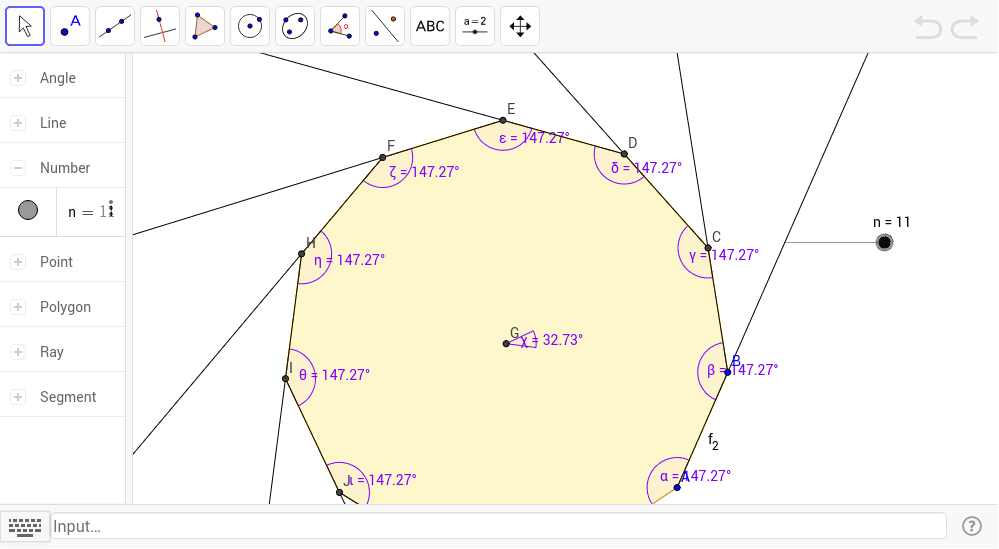
This GeoGebra example dynamically demonstrates the exterior angles of polygons, showing that the sum of exterior angles is always 360 degrees regardless of the number of sides. It covers core concepts such as the relationship between interior and exterior angles, the exterior angle sum theorem, angle measurement and rotation, and how exterior angles change as the polygon's side count varies. The construction uses the Polygon command to create the polygon, LineBisector to construct angle bisectors, Intersect to find intersection points, Angle to mark exterior angles, and Ray to extend sides. Key objects include vertices A, B, and auxiliary points (C, D, E, etc.), segments (a, b, c, etc.), and angle variables (a_1, b_1, etc.), allowing dynamic adjustment. Suitable for middle and high school students learning geometry, this resource is ideal for classroom demonstrations or independent exploration to understand the exterior angle sum theorem and its connection to interior angles.
GeoGebra Commands & Parameters
Polygon(A, B, n) → poly1, a, m, p, q, r, s, t, a_1, b_1, c_1, d_1, b, e_1, C, D, E, F, H, I, J, K, L, c, M, N, O, P, Q, R, S, T, U, d, e, f, j, k, lLineBisector(b) → gLineBisector(a) → hLineBisector(c) → iIntersect(g, h) → GAngle(poly1) → α, β, λ, μ, ν, ξ, ο, ρ, σ, τ, υ, ϕ, γ, δ, ε, ζ, η, θ, ι, κAngle(B, G, C) → χRay(B, C) → f_1Ray(C, D) → g_1Ray(D, E) → h_1Ray(E, F) → i_1Ray(F, H) → j_1Ray(H, I) → k_1Ray(I, J) → l_1Ray(J, K) → m_1Ray(K, L) → n_1Ray(L, M) → p_1Ray(M, N) → q_1Ray(N, O) → r_1Ray(O, P) → s_1Ray(P, Q) → t_1Ray(Q, R) → a_2Ray(R, S) → b_2Ray(S, T) → c_2Ray(T, U) → d_2Ray(U, A) → e_2Ray(A, B) → f_2
AI Drawing Prompt Reference
Draw a polygon using the Polygon command, then use the LineBisector command to draw angle bisectors, find intersection points with the Intersect command, and mark exterior angles with the Angle command. The polygon has vertices A and B, with auxiliary points C, D, E, etc., and edges a, b, c, etc., with exterior angles a_1, b_1, etc.
The prompt above was compiled from the original drawing commands and is for reference only.