
Explore Sum of the Interior Angles of a Quadrilateral
Loading the math board and drawing, please wait…
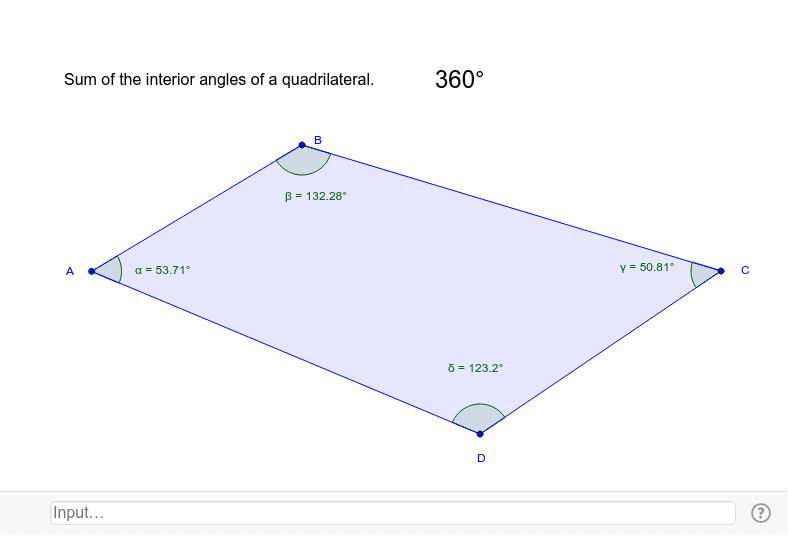
This GeoGebra example dynamically demonstrates that the sum of the interior angles of any quadrilateral is always 360°. By dragging vertices A, B, C, and D, users can reshape the quadrilateral and instantly see the measures of the four interior angles α, β, γ, δ update, while their total (AngleSum) remains constant at 360°. The core mathematical concept is the polygon interior angle sum formula (n-2)×180°, applied to n=4, reinforcing the idea of geometric invariance under deformation. The construction uses the Polygon command to create quadrilateral poly1, the Angle command to mark each interior angle, the Sum command to compute the total, and Text commands to display dynamic labels (AngleSum, SumAngles) that update in real time. This interactive tool is ideal for middle school geometry lessons, exploratory math labs, or self-study, helping students grasp why the sum is fixed regardless of shape, and fostering dynamic geometric reasoning.
GeoGebra Commands & Parameters
Polygon(A, B, C, D) → poly1, a, b, c, dAngle(D, A, B) → αAngle(A, B, C) → βAngle(B, C, D) → γAngle(C, D, A) → δSum({α, β, γ, δ}) → AngleSumText(SumAngles) → text1