
Explore Sum of Angles of Quadrilateral
Loading the math board and drawing, please wait…
In collections
Angle Relationships and Polygons
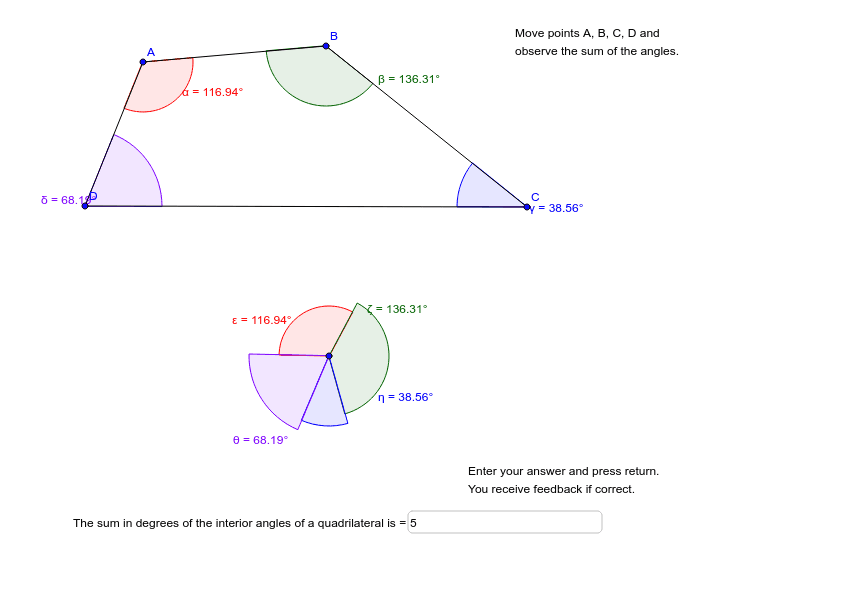
This GeoGebra example dynamically demonstrates that the sum of the interior angles of any quadrilateral is always 360°. The core mathematical concept is the quadrilateral angle-sum theorem, visualized by rotating and translating the four interior angles to a common vertex to form a full circle. Construction highlights: the Polygon command creates quadrilateral poly1, Angle commands label interior angles α, β, γ, δ; Rotate commands copy and reposition these angles around a central point, generating auxiliary points E, F, E', etc.; Circle and Segment commands help assemble the complete 360° view; Textfield and InputBox1 allow interactive manipulation of vertices to observe angle changes. Suitable for middle school geometry lessons, this interactive tool helps students verify the theorem and explore generalizations to other polygons.
GeoGebra Commands & Parameters
Polygon(A, B, C, D) → poly1, a, b, c, dAngle(D, A, B) → αAngle(A, B, C) → βAngle(B, C, D) → γAngle(C, D, A) → δRotate(E, (-α), F) → E'Angle(E', F, E) → εRotate(E', (-β), F) → E''Angle(E'', F, E') → ζRotate(E'', (-γ), F) → E'''Angle(E''', F, E'') → ηRotate(E''', (-δ), F) → GAngle(G, F, E''') → θSegment(H, I) → eCircle(F, e) → fTextfield(GUESS) → InputBox1
AI Drawing Prompt Reference
Draw a quadrilateral and label its four interior angles α, β, γ, δ. Then rotate and translate these angles around a central point so they connect end-to-end to form a full circle, demonstrating the sum of the interior angles is 360°. Include sliders to allow interactive manipulation of the vertices to observe angle changes.
The prompt above was compiled from the original drawing commands and is for reference only.