
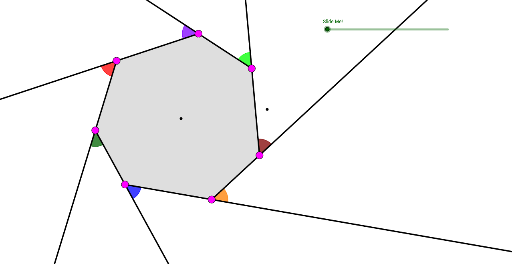
Exterior Angles of a Heptagon
Loading the math board and drawing, please wait…
In collections
Polygons & Angles
Polygons & Angles
Polygons & Angles ( s n attar)
Polygons & Angles
Polygons & Angles
Polygons & Angles
Polygons & Angles
Geometry: Polygons & Angles
Geometry: Polygons & Angles
Polygons & Angles
This GeoGebra example demonstrates the exterior angles of a heptagon (7-sided polygon) through rotation operations, providing a visual way to understand how exterior angles are formed. Key mathematical concepts include: (1) The theorem that the sum of exterior angles of any polygon equals 360°; (2) The relationship between exterior and interior angles; (3) Accumulation of rotation angles. Construction uses GeoGebra commands: Rotate to create exterior angles at each vertex, Polygon to construct the heptagon, Angle to measure angles, and Ray to draw exterior angle rays. Students can drag point A or use sliders to observe dynamic changes of exterior angles α, β, γ, etc., verifying that the sum always equals 360°. Suitable for middle school mathematics classes, teaching polygon angle properties, or as a geometric visualization resource.
GeoGebra Commands & Parameters
Circle(A, 8 - a) → cPoint(c) → BLine(A, B) → bRotate(B, 51.7°, A) → B'Angle(B, A, B') → αRotate(B', 51.7°, A) → B''Angle(B', A, B'') → βRotate(B'', 51.7°, A) → B'''Angle(B'', A, B''') → γRotate(B''', 51.7°, A) → CAngle(B''', A, C) → δRotate(C, 51.7°, A) → C'Angle(C, A, C') → εRotate(C', 51.7°, A) → C''Angle(C', A, C'') → ζCircleArc(A, B, B') → dCircleArc(A, B', B'') → eCircleArc(A, B'', B''') → fCircleArc(A, B''', C) → gCircleArc(A, C, C') → hCircleArc(A, C', C'') → kCircleArc(A, C'', B) → pPoint(d) → DPoint(e) → EPoint(f) → FPoint(g) → GPoint(h) → HPoint(k) → IPoint(p) → JRay(D, E) → iRay(E, F) → jRay(F, G) → lRay(G, H) → mRay(H, I) → nRay(I, J) → qRay(J, D) → rCircle(D, 1.5) → sCircle(E, 1.5) → tCircle(F, 1.5) → c_1Circle(G, 1.5) → d_1Circle(H, 1.5) → e_1Circle(I, 1.5) → f_1Circle(J, 1.5) → g_1Intersect(c_1, j, 2) → KIntersect(c_1, l, 1) → LIntersect(d_1, l, 2) → MIntersect(d_1, m, 1) → NIntersect(e_1, m, 2) → OIntersect(e_1, n, 1) → PIntersect(f_1, n, 2) → QIntersect(f_1, q, 1) → RIntersect(g_1, q, 2) → SIntersect(g_1, r, 1) → TIntersect(s, r, 2) → UIntersect(s, i, 1) → VIntersect(t, j, 1) → WIntersect(t, i, 2) → ZCircleSector(F, K, L) → h_1CircleSector(G, M, N) → k_1CircleSector(H, O, P) → p_1CircleSector(I, Q, R) → q_1CircleSector(J, S, T) → r_1CircleSector(D, U, V) → s_1CircleSector(E, Z, W) → t_1Polygon(G, H, I, J, D, E, F) → poly1, g_2, h_2, i_1, j_1, d_2, e_2, f_2