
Extension of Apastamba Sulbasutra I. 4
Loading the math board and drawing, please wait…
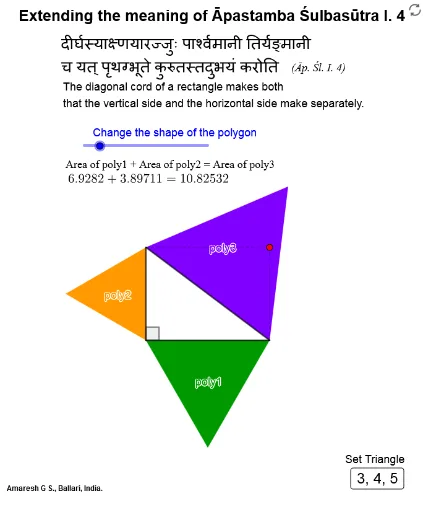
This example demonstrates the geometric meaning of Apastamba Sulbasutra I. 4, involving geometric constructions such as intersection, orthogonal line, polygon, segment, point, angle, and semicircle. Suitable for middle school and above students to learn basic geometric concepts and constructions.
GeoGebra Commands & Parameters
Intersect(xAxis, yAxis) → AOrthogonalLine(B, xAxis) → fOrthogonalLine(B, yAxis) → gIntersect(g, yAxis) → CIntersect(f, xAxis) → DPolygon(A, D, B, C) → q1, a, d, b, cSegment(C, D) → hPolygon(D, A, n) → poly1, i, d_1, g_2, j_2, E, H, K, N, Q, T, W, j, B_1, E_1, H_1, k, t, h_1, k_1, n_1, r_1, a_1Polygon(A, C, n) → poly2, l, e_1, h_2, k_2, F, I, L, O, R, U, Z, m, C_1, F_1, I_1, p, f_1, i_1, l_1, p_1, s_1, b_1Polygon(C, D, n) → poly3, q, f_2, i_2, l_2, G, J, M, P, S, V, A_1, r, D_1, G_1, J_1, s, g_1, j_1, m_1, q_1, t_1, c_1PointIn(poly2) → Pointpoly2PointIn(poly1) → Pointpoly1PointIn(poly3) → Pointpoly3Angle(D, A, C) → αSemicircle(D, A) → c_2Semicircle(A, C) → d_2Semicircle(C, D) → e_2Segment(C, A) → m_2Segment(A, D) → n_2Segment(D, C) → p_2Segment(C, B) → q_2Segment(B, D) → r_2
AI Drawing Prompt Reference
Draw a rectangle ABCD with point A on the x-axis and point B on the y-axis, with points C and D on the vertical lines of the x-axis and y-axis, respectively. Then, draw semicircles with diameters DA, AC, and CD. Next, connect points C and A, A and D, D and C, C and B, and B and D. Finally, construct points P inside polygon 2, Q inside polygon 1, and R inside polygon 3, and measure angle DAB.
The prompt above was compiled from the original drawing commands and is for reference only.