
Exploring the Area of a Cross in a Square
Loading the math board and drawing, please wait…
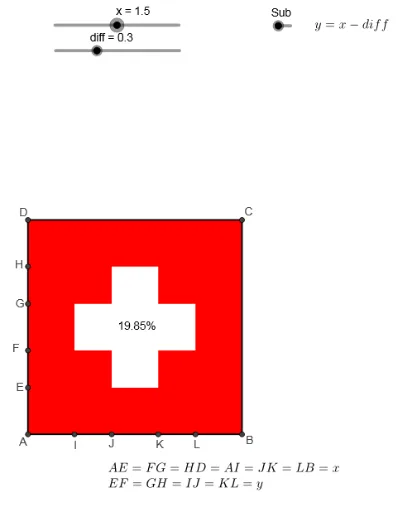
This GeoGebra example dynamically demonstrates the area of a cross-shaped region formed inside a square by the intersection of circles and orthogonal lines. The core mathematical concepts include area calculation, percentages, algebraic expressions, and the intersection of circles with polygons. The construction uses GeoGebra commands such as Intersect to find intersection points, Circle to create circles, Polygon to form polygonal regions, OrthogonalLine to draw perpendicular lines, and Centroid to locate centroids. Numerous auxiliary points (A, B, C, D, etc.) and segments (a, b, c, etc.) are employed to build the complete cross structure. This resource is suitable for middle and high school students learning geometry, area, and algebra, as well as for teachers demonstrating area formulas or percentage applications in class. By adjusting parameters, learners can visually explore how the cross area changes with the square's side length or circle radius, deepening their understanding of area ratios and algebraic relationships.
GeoGebra Commands & Parameters
Intersect(xAxis, yAxis) → ACircle(A, x1) → cIntersect(c, yAxis, 2) → ECircle(E, y1) → eIntersect(e, yAxis, 2) → FCircle(F, x1) → fIntersect(f, yAxis, 2) → GCircle(G, y1) → gIntersect(g, yAxis, 2) → HCircle(H, x1) → hIntersect(h, yAxis, 2) → DPolygon(D, A, 4) → poly1, i, j, k, l, B, COrthogonalLine(H, yAxis) → mOrthogonalLine(G, yAxis) → nOrthogonalLine(F, yAxis) → pOrthogonalLine(E, yAxis) → qIntersect(c, xAxis, 2) → ICircle(I, y1) → rIntersect(r, xAxis, 2) → JCircle(J, x1) → sIntersect(s, xAxis, 2) → KCircle(K, y1) → tIntersect(t, xAxis, 2) → LOrthogonalLine(L, xAxis) → aOrthogonalLine(K, xAxis) → f_1OrthogonalLine(J, xAxis) → g_1OrthogonalLine(I, xAxis) → h_1Intersect(m, g_1) → MIntersect(m, f_1) → NIntersect(n, f_1) → OIntersect(n, a) → PIntersect(p, a) → QIntersect(p, f_1) → RIntersect(q, f_1) → SIntersect(s, q, 1) → TIntersect(p, g_1) → UIntersect(f, p, 1) → VIntersect(n, h_1) → WIntersect(n, g_1) → ZPolygon(M, N, W, Z, O, P, Q, R, S, T, U, V) → poly2, m_1, v, w, z_1, n_1, o, p_1, q_1, r_1, s_1, t_1, uPolygon(A, B, C, D) → q1, a_2, g_2, h_2, f_2Centroid(poly2) → A_1
AI Drawing Prompt Reference
Draw a cross-shaped region inside a square formed by the intersection of four circles and vertical lines. First, draw four circles centered at the square's center, each intersecting the square's sides to form four intersection points. Then, draw vertical lines through these points to create the cross's arms. Finally, use these vertical lines and circle intersections to outline the cross-shaped region.
The prompt above was compiled from the original drawing commands and is for reference only.