
Expressing Angles Using Inverse Trigonometric Functions in Right Triangles
Loading the math board and drawing, please wait…
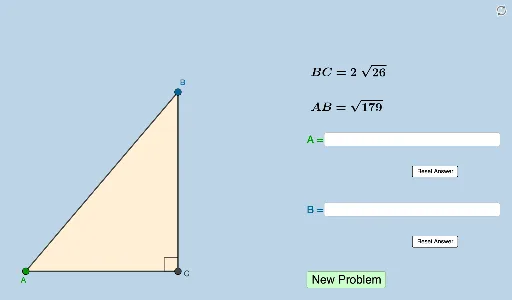
① This example demonstrates how to write expressions for acute angles of a right triangle using inverse trigonometric functions (arcsine, arccosine, arctangent) given any two side lengths. ② Core mathematical concepts include right triangle side-angle relationships, definitions of trigonometric functions, inverse trigonometric functions and their domains, and conversion between sides and angles. ③ Construction details: The GeoGebra commands used include Sequence and RandomElement to generate random side lengths, Polygon, Segment, and Angle to construct the triangle, Distance to compute side lengths, SurdText to display radical forms, Textfield and InputBox for user input, a button to trigger randomization, and text objects to dynamically show angle expressions. ④ Suitable for high school or pre-university students learning trigonometry and inverse functions, useful for classroom practice or self-study to deepen understanding of inverse trigonometric applications in geometry.
GeoGebra Commands & Parameters
Sequence(sqrt(i), i, 1, 200, 1) → adjacentlistRandomElement(oppositelist) → oRandomElement(adjacentlist) → aPolygon(C, B, A) → t1, c, a_1, bSegment(A, C) → fSegment(C, B) → gSegment(B, A) → hAngle(B, C, A) → αSurdText(a) → text1SurdText(g) → text2SurdText(h) → text3Distance(A, C) → distanceCADistance(C, B) → distanceABDistance(A, B) → distanceCBTextfield(l) → InputBox1Textfield(m) → InputBox2Random(1, 3) → n
AI Drawing Prompt Reference
Draw a right triangle with the right angle at the lower left vertex and the hypotenuse sloping upward to the right. Randomly generate two leg lengths: one is an integer, the other is the square root of an integer (displayed in radical form). Label all three vertices and show the lengths of all three sides, with the hypotenuse length in radical form. Mark the right angle with a small square symbol. Place two input boxes beside the triangle for entering angle expressions, and add a button that, when clicked, randomly generates a new set of side lengths. Below the triangle, display the expressions for the acute angles using inverse trigonometric functions (arcsine, arccosine, or arctangent), chosen randomly, based on the given side lengths.
The prompt above was compiled from the original drawing commands and is for reference only.