
Right Triangle by Peter Myers
Loading the math board and drawing, please wait…
In collections
Geometric Shapes
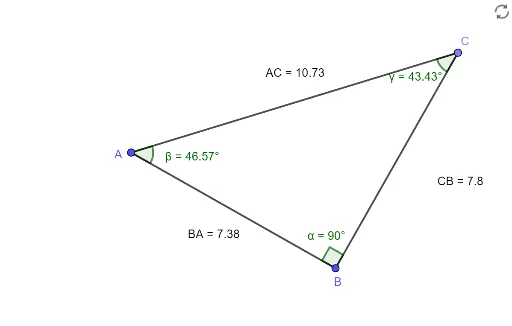
This example demonstrates the geometric construction and fundamental properties of a right triangle, involving concepts like congruence, definite integral, tangent function, rotation, and function graphing. It uses commands such as Segment, OrthogonalLine, Point, Angle, and Distance to construct the triangle and related elements, making it suitable for high school mathematics teaching, particularly for visualizing geometric constructions and function graphs.
GeoGebra Commands & Parameters
Segment(A, B) → fOrthogonalLine(B, f) → gPoint(g) → CSegment(B, C) → hSegment(C, A) → iAngle(A, B, C) → αAngle(B, A, C) → βAngle(A, C, B) → γDistance(A, C) → distanceACDistance(C, B) → distanceCBDistance(B, A) → distanceBA
AI Drawing Prompt Reference
Draw a right triangle ABC with points A, B, and C as vertices, where AB is the hypotenuse and BC and AC are the legs. Use the segment tool to draw AB, then draw a perpendicular line to AB with foot C. Next, draw BC and AC to ensure that angle ABC is a right angle. Measure the degrees of angles A, B, and C, as well as the lengths of sides AC, BC, and AB.
The prompt above was compiled from the original drawing commands and is for reference only.