
Exponents Game - Level 4
Loading the math board and drawing, please wait…
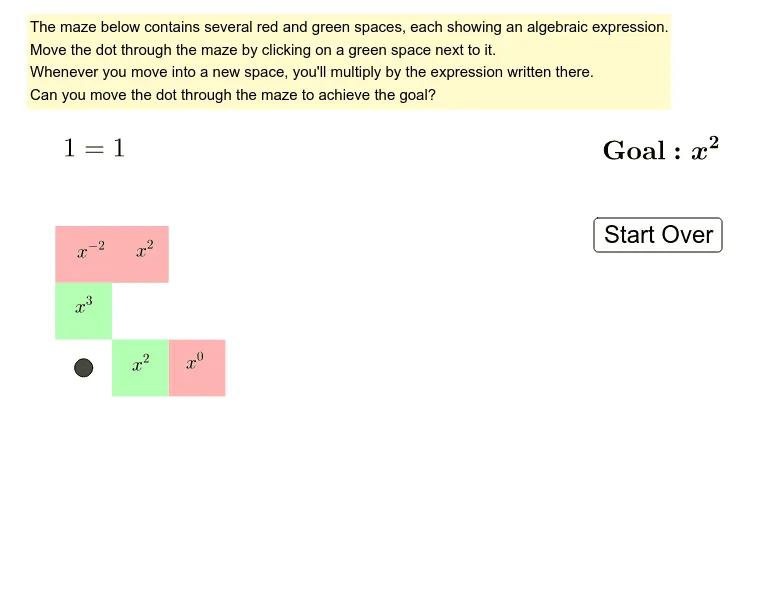
Practice exponent rules through a puzzle game. This example demonstrates how to apply exponent rules to solve practical problems, involving core math concepts such as exponent operations and properties of powers. Using GeoGebra commands like Intersect, Polygon, and Point, you can dynamically adjust parameters to observe changes in the graph of exponential functions. Suitable for middle school and above students or teachers for teaching and self-practice.
GeoGebra Commands & Parameters
Intersect(xAxis, yAxis) → APolygon(A, B, C, D) → polyA6, a, b, c, dPoint(yAxis) → FPolygon(D, C, E, F) → polyA5, d_1, c_1, e, fPoint(yAxis) → HPolygon(F, E, G, H) → polyA4, f_1, e_1, g, hPoint(yAxis) → JPolygon(J, I, K, L) → polyA2, j_1, i_1, k, lPolygon(L, K, M, N) → polyA1, l_1, k_1, m, nPolygon(B, O, P, C) → polyB6, b_1, o, p, c_2Polygon(C, P, Q, E) → polyB5, c_3, p_1, q, e_2Polygon(E, Q, R, G) → polyB4, e_3, q_1, r, g_2Polygon(G, R, S, I) → polyB3, g_3, r_1, s, i_2Polygon(I, S, T, K) → polyB2, i_3, s_1, t, k_2Polygon(K, T, U, M) → polyB1, k_3, t_1, u, m_1Point(xAxis) → VPolygon(O, V, W, P) → polyC6, o_1, v, w, p_2Polygon(P, W, Z, Q) → polyC5, p_3, w_1, z_1, q_2Polygon(Q, Z, A_1, R) → polyC4, q_3, z_2, a_1, r_2Polygon(R, A_1, B_1, S) → polyC3, r_3, a_2, b_2, s_2Polygon(S, B_1, C_1, T) → polyC2, s_3, b_3, c_4, t_2Polygon(T, C_1, D_1, U) → polyC1, t_3, c_5, d_2, u_1Point(xAxis) → E_1Polygon(V, E_1, F_1, W) → polyD6, v_1, e_4, f_2, w_2Polygon(W, F_1, G_1, Z) → polyD5, w_3, f_3, g_4, z_3Polygon(Z, G_1, H_1, A_1) → polyD4, z_4, g_5, h_2, a_3Polygon(A_1, H_1, I_1, B_1) → polyD3, a_4, h_3, i_4, b_4Polygon(B_1, I_1, J_1, C_1) → polyD2, b_5, i_5, j_2, c_6Polygon(C_1, J_1, K_1, D_1) → polyD1, c_7, j_3, k_4, d_3Point(xAxis) → L_1Polygon(E_1, L_1, M_1, F_1) → polyE6, e_5, l_2, m_2, f_4Polygon(F_1, M_1, N_1, G_1) → polyE5, f_5, m_3, n_1, g_6Polygon(G_1, N_1, O_1, H_1) → polyE4, g_7, n_2, o_2, h_4Polygon(H_1, O_1, P_1, I_1) → polyE3, h_5, o_3, p_4, i_6Polygon(I_1, P_1, Q_1, J_1) → polyE2, i_7, p_5, q_4, j_4Polygon(J_1, Q_1, R_1, K_1) → polyE1, j_5, q_5, r_4, k_5Point(xAxis) → S_1Polygon(L_1, S_1, T_1, M_1) → polyF6, l_3, s_4, t_4, m_4Polygon(M_1, T_1, U_1, N_1) → polyF5, m_5, t_5, u_2, n_3Polygon(N_1, U_1, V_1, O_1) → polyF4, n_4, u_3, v_2, o_4Polygon(O_1, V_1, W_1, P_1) → polyF3, o_5, v_3, w_4, p_6Polygon(P_1, W_1, Z_1, Q_1) → polyF2, p_7, w_5, z_5, q_6Polygon(Q_1, Z_1, A_2, R_1) → polyF1, q_7, z_6, a_5, r_5
AI Drawing Prompt Reference
Draw a complex pattern of multiple polygons in a coordinate system, symmetrically arranged around the x-axis and y-axis, resembling a maze. Start with a quadrilateral and progressively expand outward by adding new quadrilaterals each time, ensuring each new polygon shares one side with the previous one. All polygons should be filled with color and maintain symmetry.
The prompt above was compiled from the original drawing commands and is for reference only.