
Exponents Game - Level 4 by Dr. Fisher
Loading the math board and drawing, please wait…
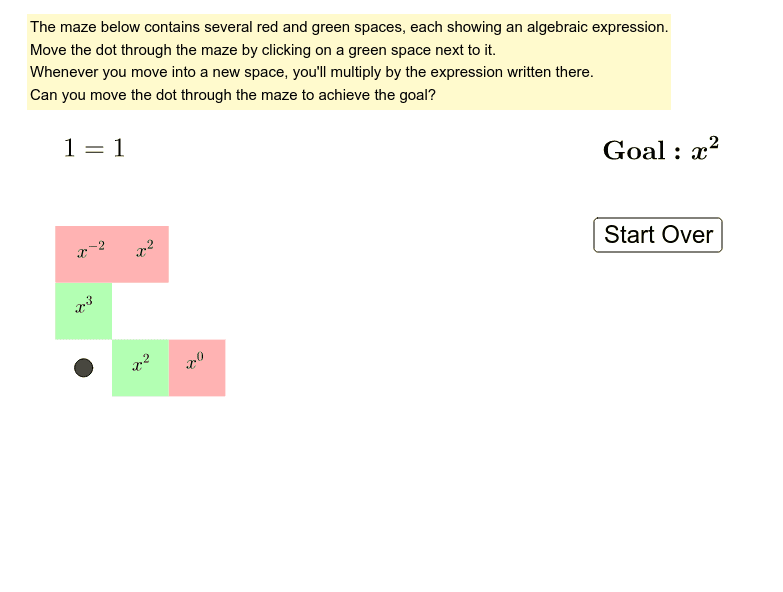
Practice exponent rules through a puzzle game. This example demonstrates the use of GeoGebra commands like Polygon, Point, and Intersect to construct geometric shapes. Suitable for middle school and above students to practice exponent operations.
GeoGebra Commands & Parameters
Intersect(xAxis, yAxis) → APolygon(A, B, C, D) → polyA6, a, b, c, dPoint(yAxis) → FPolygon(D, C, E, F) → polyA5, d_1, c_1, e, fPoint(yAxis) → HPolygon(F, E, G, H) → polyA4, f_1, e_1, g, hPoint(yAxis) → JPolygon(J, I, K, L) → polyA2, j_1, i_1, k, lPolygon(L, K, M, N) → polyA1, l_1, k_1, m, nPolygon(B, O, P, C) → polyB6, b_1, o, p, c_2Polygon(C, P, Q, E) → polyB5, c_3, p_1, q, e_2Polygon(E, Q, R, G) → polyB4, e_3, q_1, r, g_2Polygon(G, R, S, I) → polyB3, g_3, r_1, s, i_2Polygon(I, S, T, K) → polyB2, i_3, s_1, t, k_2Polygon(K, T, U, M) → polyB1, k_3, t_1, u, m_1Point(xAxis) → VPolygon(O, V, W, P) → polyC6, o_1, v, w, p_2Polygon(P, W, Z, Q) → polyC5, p_3, w_1, z_1, q_2Polygon(Q, Z, A_1, R) → polyC4, q_3, z_2, a_1, r_2Polygon(R, A_1, B_1, S) → polyC3, r_3, a_2, b_2, s_2Polygon(S, B_1, C_1, T) → polyC2, s_3, b_3, c_4, t_2Polygon(T, C_1, D_1, U) → polyC1, t_3, c_5, d_2, u_1Point(xAxis) → E_1Polygon(V, E_1, F_1, W) → polyD6, v_1, e_4, f_2, w_2Polygon(W, F_1, G_1, Z) → polyD5, w_3, f_3, g_4, z_3Polygon(Z, G_1, H_1, A_1) → polyD4, z_4, g_5, h_2, a_3Polygon(A_1, H_1, I_1, B_1) → polyD3, a_4, h_3, i_4, b_4Polygon(B_1, I_1, J_1, C_1) → polyD2, b_5, i_5, j_2, c_6Polygon(C_1, J_1, K_1, D_1) → polyD1, c_7, j_3, k_4, d_3Point(xAxis) → L_1Polygon(E_1, L_1, M_1, F_1) → polyE6, e_5, l_2, m_2, f_4Polygon(F_1, M_1, N_1, G_1) → polyE5, f_5, m_3, n_1, g_6Polygon(G_1, N_1, O_1, H_1) → polyE4, g_7, n_2, o_2, h_4Polygon(H_1, O_1, P_1, I_1) → polyE3, h_5, o_3, p_4, i_6Polygon(I_1, P_1, Q_1, J_1) → polyE2, i_7, p_5, q_4, j_4Polygon(J_1, Q_1, R_1, K_1) → polyE1, j_5, q_5, r_4, k_5Point(xAxis) → S_1Polygon(L_1, S_1, T_1, M_1) → polyF6, l_3, s_4, t_4, m_4Polygon(M_1, T_1, U_1, N_1) → polyF5, m_5, t_5, u_2, n_3Polygon(N_1, U_1, V_1, O_1) → polyF4, n_4, u_3, v_2, o_4Polygon(O_1, V_1, W_1, P_1) → polyF3, o_5, v_3, w_4, p_6Polygon(P_1, W_1, Z_1, Q_1) → polyF2, p_7, w_5, z_5, q_6Polygon(Q_1, Z_1, A_2, R_1) → polyF1, q_7, z_6, a_5, r_5
AI Drawing Prompt Reference
Draw a complex geometric pattern composed of multiple squares and rectangles. Start by plotting points A, B, C, and D on the coordinate axes and connecting them to form a square. Then plot point F on the y-axis and connect D, C, E, and F to form a rectangle. Continue by plotting point H on the y-axis and connecting F, E, G, and H to form another rectangle. Repeat this process until all rectangles and squares are drawn, with each shape adjacent to the previous one, forming a complex geometric pattern.
The prompt above was compiled from the original drawing commands and is for reference only.