
F1 Racing Track Geometry
Loading the math board and drawing, please wait…
In collections
animation Constructions
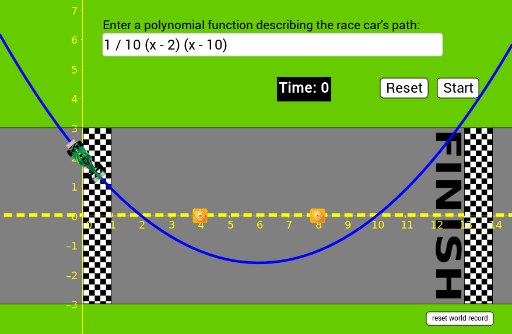
This example demonstrates the geometric construction of an F1 racing track with cones, involving coordinate geometry, vectors, parametric equations, integration, and limits. Key GeoGebra commands like Point, Segment, Circle, and Vector are used to create the car path and obstacles, making it suitable for high school and above students studying spatial geometry and calculus applications.
GeoGebra Commands & Parameters
Point(xAxis) → FPoint(xAxis) → EPoint(xAxis) → DPoint(xAxis) → cone2Point(xAxis) → cone1Textfield(carPath) → InputBox1Min(0.035 / Curvature[carCenter, carPath]^(2), 0.15) → velSegment(carCenter, cone1) → cone1segSegment(carCenter, cone2) → cone2segLength(cone1seg) → cone1distLength(cone2seg) → cone2distVector((x(cone1), carPath(x(cone1))), (x(cone2), (-carPath(x(cone2))))) → missedArrowCircle(carCenter, 1.2) → hitCone
AI Drawing Prompt Reference
Draw an F1 racing track marked by cones, demonstrating its geometric construction. The track should be derived using coordinate geometry and vector calculations, with speed influenced by curvature. Place cones around the track as obstacles, and calculate the distance and direction vectors from the track center to the cones. Represent potential collision areas with circles.
The prompt above was compiled from the original drawing commands and is for reference only.